Çevrimiçi yedekleme, bir bilgisayardan veya sabit diskten uzak bir sunucuya (genellikle bulut depolama hizmeti olarak adlandırılır) bilgi yedeklemek için bir ağ bağlantısının kullanılması anlamına gelir. Çevrimiçi yedekleme hizmetleri genellikle verilere erişmek ve yedeklemenin operasyonel durumunu izlemek için web tabanlı bir yönetim konsolu sağlar.
Yedeklenen dosyalar şifrelenecek ve sağlayıcının veri merkezinde saklanacaktır. Bireyler veya kuruluşlar, veri yedeklerini doğrudan indirebilir ve kullanabilir veya herhangi bir İnternet bağlantılı bilgisayardan veya cihazdan arşivlenmiş dosyalara göz atabilir.

Veri Koruması İçin Neden Çevrimiçi Yedekleme Kullanmalısınız?
Günümüzde her ölçekteki kullanıcı ve kuruluş, sunduğu birçok avantaj nedeniyle giderek daha fazla çevrimiçi veri yedeklemeye güveniyor:
- Veri kaybından kaçının : Yerel depolamada saklanan veriler, donanım arızası, sistem çökmeleri ve doğal afetler nedeniyle hala kaybolma riski altındadır. Ancak dosyalarınızı çevrimiçi olarak yedeklerseniz, yangın, sel veya çalışan hırsızlığı gibi bir felaket durumunda bile verileriniz güvende kalır.
- Düşük başlangıç maliyeti : Çevrimiçi yedekleme genellikle herhangi bir donanım satın almanızı gerektirmez ve belirli bir süre için belirli miktarda ücretsiz depolama alanı veya ücretsiz deneme sağlar. Yani yalnızca birkaç dosyayı yedeklemeniz gerekiyorsa, hiçbir şey ödemeniz bile gerekmez.
- Evrensel geri yükleme : Çoğu çevrimiçi yedekleme, dosyaları bir web tarayıcısı arayüzü veya bir PC istemcisi ile yedeklemenizi ve geri yüklemenizi sağlar. Bu nedenle, evrensel bir geri yükleme gerçekleştirerek, dosyaları iki cihaz arasında aktarmanız çok kolaydır.
Windows Bilgisayarlar için Ücretsiz Çevrimiçi Yedekleme Hizmeti
CBackup, çok kullanışlı ve uygun maliyetli olduğu için son derece önerilen ücretsiz bir bulut yedekleme hizmetidir. Özellikle Windows 11/10/8/8.1/7/XP için tasarlanmıştır. Bununla, bilgisayar dosyalarınızı buluta kolayca ve güvenli bir şekilde yedekleyebilirsiniz.

CBackup'ın verilerinizi uzaktan saklamanız için sunduğu bulut sunucusuna CBackup Cloud denir, sonsuza dek 10 GB'a kadar ücretsiz yedekleme alanının keyfini çıkarabilirsiniz. CBackup Cloud'da yedeklenen veriler güvende tutulur ve yedekleri buluttan istediğiniz zaman orijinaline veya farklı bir konuma geri yükleyebilirsiniz.
Dahası, CBackup buluttan buluta yedekleme, buluttan buluta senkronizasyon ve bulut depolama kombinasyon özellikleri yapmanıza yardımcı olabilir. Google Drive, Dropbox, OneDrive vb. gibi çok sayıda ana akım bulut depolamasını destekler. CBackup'a bulut depolama hesaplarınızı ekledikten sonra, Dropbox'ı OneDrive'a taşıma gibi eklenen bulut sürücüleri arasında dosyaları doğrudan ve hızlı bir şekilde taşıyabilirsiniz.
CBackup ile Çevrimiçi Yedekleme Yapmak İçin Adım Adım Kılavuz
Burada, tüm kullanıcılar için en kolay arayüze ve işletime sahip olan CBackup'ın yardımıyla dosyaları çevrimiçi olarak nasıl yedekleyeceğinizi göstereceğiz:
Adım 1. CBackup yazılımını indirin ve oturum açmak için bir hesap oluşturun.
Adım 2. Yedekleme bölümüne gidin ve çevrimiçi yedeklemenizi yapmak için Bilgisayarı CBackup Cloud'a Yedekle'ye tıklayın.
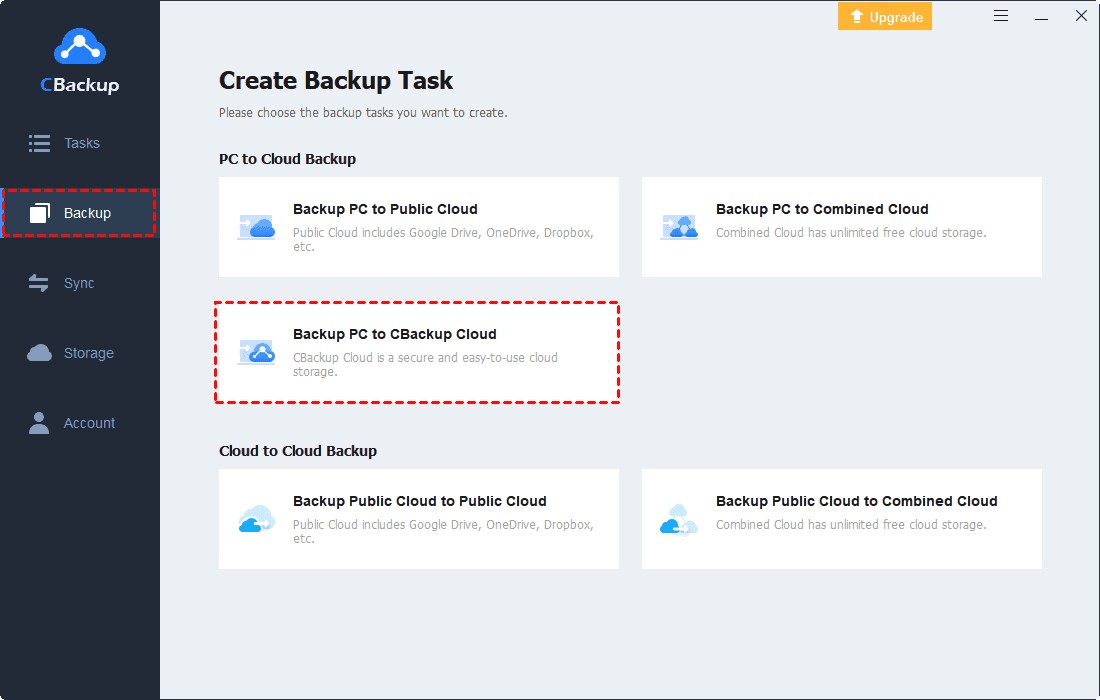
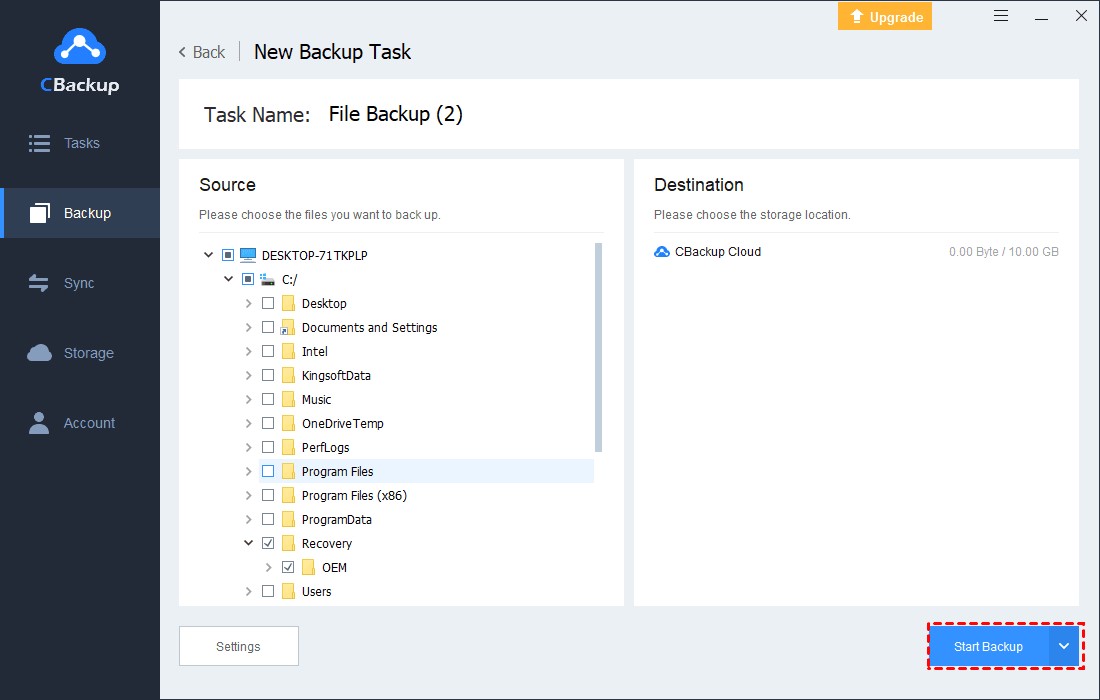
Adım 3. Buluta yedeklemek istediğiniz Windows PC belgelerini veya klasörlerini seçin. CBackup Cloud varsayılan olarak yedekleme hedefi olarak belirlenir.
Not: CBackup ayrıca bulut yedekleme hedefleriniz olarak Google Drive, Dropbox ve OneDrive gibi popüler bulut sürücülerini de destekler. Seçim yapmak için Yedekleme > Bilgisayarı Genel Buluta Yedekle'ye tıklayabilirsiniz.
Adım 4. Son olarak dosyalarınızı çevrimiçi yedeklemek için Yedeklemeyi Başlat'a tıklayın.
Sınırsız Çevrimiçi Yedekleme Alanı Ücretsiz Nasıl Elde Edilir
Çevrimiçi depolanacak daha fazla dosya ve klasörle, daha fazla bulut yedekleme alanına ihtiyaç duyabilirsiniz. Verileriniz için sınırsız çevrimiçi yedeklemeler oluşturmak için CBackup, bulut depolama alanını ücretsiz olarak birleştirmenize ve artırmanıza yardımcı olabilecek bir "Bulutu Birleştir" özelliği sunar.
Örneğin, 2 ücretsiz Google Drive hesabını birleştirerek 30 GB ücretsiz bulut alanı kazanabilir; ihtiyaçlarınıza göre farklı platformlardan bulut seçebilir veya ücretli ve ücretsiz bulut hesaplarını birleştirebilirsiniz.
Adım 1. Depolama sekmesine bulutlarınızı ekleyin. Google Drive, OneDrive veya Dropbox > Şimdi Yetkilendir'i seçin. CBackup'a bulut yetkisi vermek için talimatları izleyin ve CBackup'a sınırsız bulut hesabı ekleyebilirsiniz.

Adım 2. Depolama segmentinde + Birleşik Bulut Ekle'ye tıklayın.
Adım 3. Birleşik Bulut'u yeniden adlandırın ve eklediğiniz tüm bulut sürücülerini işaretleyin ve İleri'ye tıklayın. Tüm bulut sürücüleriniz için yedekleme sırasını belirleyin ve Birleştir'e tıklayın.

Bulutları birleştirdikten sonra, yeterli bulut hesabınız olduğu sürece sınırsız bulut yedekleme alanı elde edebilirsiniz. Şimdi, Yedekleme > Bilgisayarı Birleşik Buluta Yedekle'ye tıklayın, dosyaları sınırsız bulut yedekleme alanına kaydedebilirsiniz.

Özetlersek
CBackup'ın yardımıyla bilgisayar dosyalarınız ve klasörleriniz için ücretsiz çevrimiçi yedekleme yapmak için yukarıdaki kılavuzu takip edebilirsiniz. Sınırsız çevrimiçi bulut depolama alanı elde etmek istiyorsanız, bulutları birleştirmek ve bulut yedekleme alanını ücretsiz olarak artırmak için bu araca da güvenebilirsiniz. Ayrıca, CBackup bulut depolama yönetimi ve buluttan buluta aktarım işlevleri sunar. Bu aracı edinin ve birden fazla hizmetin keyfini çıkarmak için yalnızca bir arayüzle zamandan ve emekten tasarruf edin.

What Happens to Your Business Number When a Work Phone Is Lost, Stolen or Replaced?
What happens to your business number depends on where it lives. If the number is tied to the SIM in the lost phone, it stops working for you until the carrier issues a replacement SIM or eSIM, and calls from customers go nowhere in the meantime.
If the number lives in a cloud phone account instead, losing the phone doesn't take the number with it. Calls can ring the rest of the team straight away, and the employee signs into the calling app on a new phone to pick up where they left off, with their call history and voicemails still in the account.

Cricfy APK Download Latest Version For Android
Cricfy is a sports streaming application designed for users interested in watching live sports and following different sporting events. Its main focus is to provide convenient access to sports-related content through a mobile-friendly platform.
Cricket is an important part of its appeal, particularly for viewers who enjoy international matches, domestic competitions, and major cricket tournaments. Depending on the available content and supported sources, users may also find football and other sports-related options.
The application is particularly interesting for people who prefer watching sports on their Android devices rather than sitting in front of a television.

Uniwin-Global Rockchip Embedded Motherboards: Sourcing from China for MOQ, QC, Export and Technical Support
Sourcing Rockchip motherboards from China is a procurement question, not a price search. The seven things that actually decide whether a supplier works: pricing that scales with order size, a quality floor you can verify, export terms you can clear, a sample path that starts below the MOQ, technical support that answers, and engineering that catches integration issues before they cost you a quarter.
Uniwin-Global is the running example. The company has built Rockchip boards since 2016 [3], the current flagship is the RK3588 M588 with a 6 TOPS NPU [1], and the site lists 20+ countries served and 200+ projects delivered [4]. The published quality baseline is a sub-1% defect rate with a 1-year motherboard warranty, and the service baseline is a 2-hour response and 48-hour resolution [5, 6].
Two other supplier lanes exist: multi-platform makers that quote Rockchip alongside Allwinner and others, and dev-kit sellers that sell a reference board at a low price. Each lane fits a different stage of the project. The wrong lane is more expensive than the right one at the same unit price. Pick the lane first. The price follows.
One caution. A product page is a claim. The MOQ, the trade term, the QC gate and the SLA all need to be in writing before the PO is signed.

How to Build a HIFU Product Line That Distributors Can Manage
Every HIFU variant a distributor adds brings its own cartridge bin, manual, training file, and spare-parts list. Product lines rarely get out of hand through planning. They grow one request at a time: a different housing color, a narrower cartridge, a regional plug for one important clinic. Eventually pricing can't be explained in one sentence, and cartridge orders split across codes that look almost identical.
This guide is for distributors, importers, and private-label buyers who stock HIFU systems for clinics and med spas and carry the after-sales work themselves. It covers how to group clinic demand, which differences deserve their own model code, how to price tiers against landed cost, and how to plan cartridge replenishment and service records around machines already in the field. The aim is a line chosen by what you can stock, train, and service, rather than by what clinics happen to ask for.

Check SIM Owner Details in Pakistan Official Guide
Phones have become an integral part of human life. From making calls to mobile banking and shopping and social media every function requires a sim card to get connected in Pakistan. A responsible person must know how many sim cards are registered under his CNIC and if they are verified or not. The Check SIM Owner Details Pakistan system enables you to ensure that your SIM cards are legitimate and registered under your details.
While searching for Fresh SIM Database, it is critical to understand that SIM card details are private and confidential, and only the owner can check them. This article will explain what SIM owner details are, why it is essential to verify them, how to check them officially, and why it is safer to avoid unverified sources for checking.

Pak SIM Owner Details and SIM Ownership Complete Guide
It becomes difficult to understand and navigate SIM card registration and ownership in Pakistan considering all the regulations and the amount of information that is available online. You may have gotten a new SIM card, or you might be curious about how many SIM cards are associated with your CNIC number; in any case, having an understanding of the process is critical.

How to Check SIM Owner Details and Registration Status in Pakistan
Checking your SIM card details is very important in Pakistan today. Every mobile SIM card is directly linked to your CNIC number through thumb verification. Keeping an eye on your Pak Sim Owner Details protects your identity, stops scams, and makes sure nobody uses your name for wrong activities. Many people search for ways to check their Sim Owner Details 2026 status, see active numbers, and remove unused SIMs. This article explains how you can easily check everything yourself without any trouble.

Apple iPhone Duo Review: Foldable iPhone Specs, Price & Features
Apple is entering the foldable smartphone market with the iPhone Duo, a premium foldable iPhone built around two displays, the A20 Pro processor, a titanium construction, dual 48 MP cameras and a redesigned iOS experience focused on multitasking. But the iPhone Duo is interesting for another reason as well. A folding phone is inherently more complex than a conventional smartphone. It has two displays, a precision hinge, multiple operating positions and completely new ways of using cameras and applications.
 IMEI KONTROL ET


















