คุณเป็นหนึ่งในผู้ใช้ iPhone จำนวนนับไม่ถ้วนที่ใช้ Yahoo Mail ในการสื่อสารทางอีเมลทุกวันหรือไม่? หากคุณพบว่าตัวเองกำลังเผชิญกับปัญหากวนใจของ " Yahoo Mail ไม่ทำงานบน iPhone " อย่ากลัวเลย! ในบทความนี้ เราจะให้คำแนะนำและเทคนิคที่เป็นประโยชน์แก่คุณในการแก้ปัญหาและแก้ไขปัญหานี้ ในตอนท้ายของการอ่านนี้ คุณจะได้รับความรู้ในการคืนค่าการทำงานที่ราบรื่นของ Yahoo Mail บน iPhone ที่คุณรัก ดังนั้น อ่านต่อไปเพื่อค้นหาโซลูชันที่มีประสิทธิภาพที่จะช่วยให้คุณกลับมาติดตามการสื่อสารทางอีเมลได้อีกครั้ง!
คุณเป็นหนึ่งในผู้ใช้ iPhone จำนวนมากที่ผิดหวังกับ อีเมล Yahoo ที่ไม่ทำงานบนปัญหา iPhone หรือไม่? ผู้ใช้ iPhone หลายรายรายงานปัญหาในการเข้าถึงอีเมล โดยเฉพาะ Yahoo Mail
ตั้งแต่การทำงานผิดปกติในฟีเจอร์กล่องจดหมายไปจนถึงแอปไม่โหลดเลย ปัญหาดังกล่าวอาจสร้างความไม่สะดวกให้กับผู้ที่ใช้ Yahoo Mail ในการสื่อสารส่วนตัวและเพื่ออาชีพ
แต่ไม่ต้องกังวล! เราได้สำรวจอินเทอร์เน็ตและทดสอบวิธีแก้ปัญหาที่ใช้งานได้จริงทั้งหมดเพื่อนำเสนอคำแนะนำที่ครอบคลุมเกี่ยวกับการแก้ไขปัญหา Yahoo Mail บน iPhone ของคุณ โดยไม่คำนึงถึงเวอร์ชัน iOS ของคุณ
ผ่อนคลายและลองใช้เคล็ดลับเหล่านี้เพื่อทำให้ Yahoo Mail ของคุณกลับมาทำงานอีกครั้ง!
- ส่วนที่ 1: เคล็ดลับที่เป็นประโยชน์ในการแก้ไข Yahoo Mail ไม่ทำงานบน iPhone
- ส่วนที่ 2: วิธีซ่อมแซมระบบ iOS เพื่อแก้ไข Yahoo ไม่ทำงานบน iPhone
ส่วนที่ 1: เคล็ดลับที่เป็นประโยชน์ในการแก้ไข Yahoo Mail ไม่ทำงานบน iPhone
Yahoo Mail เป็นหนึ่งในบริการอีเมลที่ใช้กันอย่างแพร่หลายมากที่สุดในโลก แต่อาจขัดขวางประสิทธิภาพการทำงานของคุณ เมื่อจู่ๆ iPhone ของคุณไม่ทำงาน เพื่อแก้ไขปัญหานี้ ให้ลองทำตามเคล็ดลับที่ใช้ได้จริงเหล่านี้เพื่อช่วยให้ Yahoo Mail ของคุณทำงานได้อีกครั้ง:
เคล็ดลับที่ 1: ตรวจสอบการเชื่อมต่ออินเทอร์เน็ตของคุณ
หนึ่งในสาเหตุที่พบบ่อยที่สุดว่าทำไม Yahoo Mail ไม่โหลดบน iPhone คือการเชื่อมต่ออินเทอร์เน็ตที่ไม่ดีหรือไม่เสถียร หากคุณประสบปัญหานี้ ให้ลองเชื่อมต่อกับเครือข่าย Wi-Fi อื่นหรือปิดใช้งานข้อมูลเซลลูลาร์ของคุณแล้วเปิดใช้งานอีกครั้ง คุณยังสามารถลองรีเซ็ตการตั้งค่าเครือข่ายของคุณ ซึ่งบางครั้งอาจแก้ไขปัญหาการเชื่อมต่อได้
เคล็ดลับ 2: ล้างแคชและคุกกี้
แคชและคุกกี้เป็นข้อมูลชั่วคราวประเภทหนึ่งที่จัดเก็บไว้ใน iPhone เมื่อคุณเยี่ยมชมเว็บไซต์หรือใช้แอพ เมื่อเวลาผ่านไป ไฟล์เหล่านี้อาจสะสมและทำให้เกิดปัญหากับประสิทธิภาพของ Yahoo Mail
ในการล้างแคชและคุกกี้ของคุณ ให้ทำตามขั้นตอนเหล่านี้:
- ไปที่การตั้งค่า iPhone ของคุณ
- เลื่อนลงมาและค้นหา "Safari" (หรือเบราว์เซอร์ที่คุณใช้บ่อยที่สุด)
- เลือก "ล้างคุกกี้และข้อมูล" หรือ "ล้างคุกกี้และล้างแคช"
- ยืนยันการเลือกของคุณเมื่อได้รับแจ้ง
ตอนนี้ควรล้างแคชและคุกกี้ของคุณ ดูว่าจะแก้ปัญหา Yahoo ไม่ทำงานบน iPhone ได้หรือไม่
เคล็ดลับ 3: ซ่อมแซมระบบ IOS ของคุณด้วยซอฟต์แวร์ที่เชื่อถือได้ - Wondershare Dr.Fone
หากคุณลองใช้วิธีแก้ไขปัญหาข้างต้นแล้วและยังคงประสบปัญหากับ Yahoo Mail อาจถึงเวลาซ่อมแซมระบบ iOS ของคุณแล้ว Wondershare Dr.Fone เป็นซอฟต์แวร์ที่เชื่อถือได้ที่สามารถช่วยคุณ ตรวจสอบและซ่อมแซมระบบ iOS ของคุณ รวมถึงซอฟต์แวร์ที่อาจก่อให้เกิดปัญหากับ Yahoo Mail
เคล็ดลับ 4: ตรวจสอบการตั้งค่าอีเมล Yahoo
การตรวจสอบการตั้งค่า Yahoo Mail เป็นขั้นตอนสำคัญที่ผู้ใช้หลายคนมักมองข้าม นี่อาจเป็นปัญหาได้เนื่องจากบางครั้งการตั้งค่าที่ไม่ถูกต้องอาจทำให้เกิดปัญหากับ Yahoo Mail บน iPhone
ถ้าจะเช็คการตั้งค่า Yahoo Mail ให้ไปที่ Settings ของ iPhone เลือก "Passwords & Accounts" แล้วเลือกบัญชี Yahoo ของคุณ ตรวจสอบการตั้งค่าเพื่อให้แน่ใจว่าถูกต้อง และทำการปรับเปลี่ยนที่จำเป็น
เคล็ดลับ 5: ติดต่อฝ่ายสนับสนุนของ Yahoo
หากวิธีแก้ปัญหาข้างต้นไม่ได้ผล อาจจำเป็นต้องติดต่อฝ่ายสนับสนุนของ Yahoo เพื่อขอความช่วยเหลือเพิ่มเติมและแก้ไขปัญหา
คำตัดสินของผู้เขียน:
จากการวิจัยและการทดสอบของเรา เราขอแนะนำให้ซ่อมแซมระบบ IOS ของคุณด้วย Wondershare Dr.Fone เพื่อแก้ไขปัญหา Yahoo Mail ไม่ทำงานบน iPhone โซลูชันนี้ค่อนข้างมีประสิทธิภาพและไม่ควรมองข้าม
ส่วนที่ 2: วิธีซ่อมแซมระบบ iOS ด้วย Wondershare Dr.Fone เพื่อแก้ไข Yahoo ไม่ทำงานบน iPhone
ดังที่ได้กล่าวไว้ก่อนหน้านี้ การซ่อมแซมระบบ iOS อาจเป็นหนึ่งในวิธีแก้ปัญหาที่ดีที่สุดสำหรับปัญหา Yahoo Mail ไม่โหลดบน iPhone Wondershare Dr.Fone มอบวิธีที่มีประสิทธิภาพและเชื่อถือได้ในการซ่อมแซมระบบ iOS และแก้ไขปัญหา Yahoo ไม่ทำงานบน iPhone
ขั้นตอนในการซ่อมแซมระบบ iOS ของคุณโดยใช้ การซ่อมแซมระบบ Wondershare Dr.Fone (iOS) :
ขั้นตอนที่ 1: ติดตั้ง Wondershare Dr.Fone และเปิดเครื่องมือซ่อมแซมระบบ
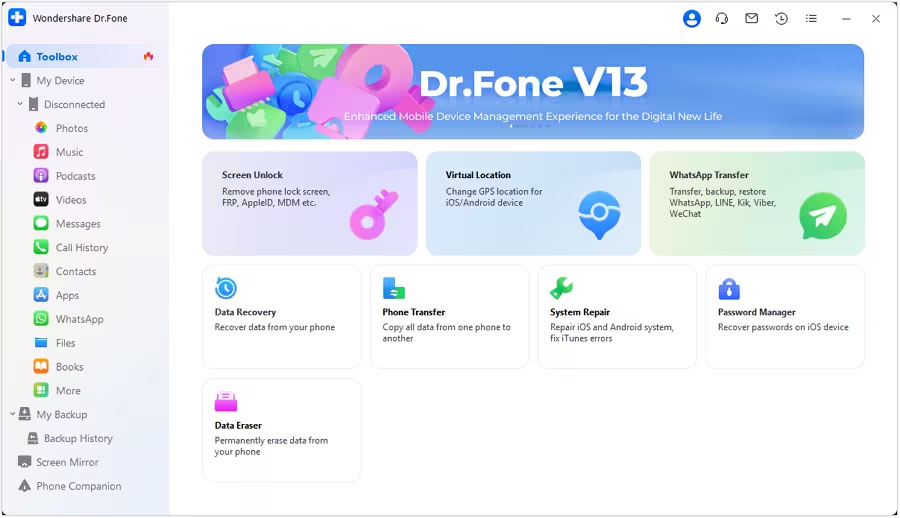
หลังจากดาวน์โหลด Wondershare Dr.Fone บนคอมพิวเตอร์ของคุณแล้ว ให้เปิดโปรแกรม ถัดไป ไปที่ส่วนกล่องเครื่องมือที่มุมบนซ้ายของหน้าจอ และเลือกการซ่อมแซมระบบจากรายการตัวเลือกที่แสดงบนหน้าจอหลัก
ขั้นตอนที่ 2: เข้าสู่โหมดการกู้คืน
เชื่อมต่ออุปกรณ์ทั้งสอง (iPhone และคอมพิวเตอร์) โดยใช้สายเชื่อมต่อ จากนั้นเลือก iOS Repair จากหน้าต่างที่เปิดขึ้น คุณสามารถเลือกการซ่อมแซมแบบมาตรฐานสำหรับวิธีการที่ง่ายกว่า และทำตามคำแนะนำจนกว่าอุปกรณ์ของคุณจะเข้าสู่โหมดการกู้คืน

ขั้นตอนที่ 3: ดาวน์โหลดเฟิร์มแวร์ iOS
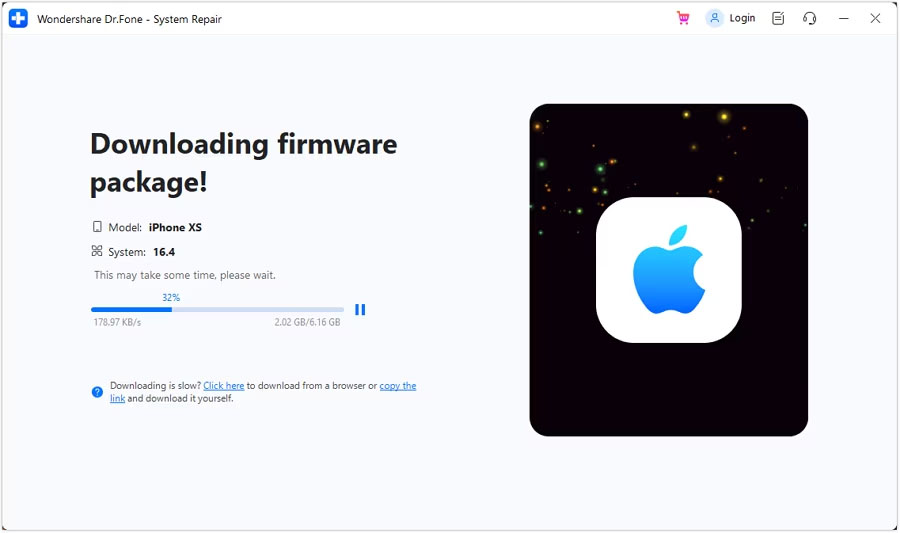
หลังจากที่คุณเข้าสู่โหมดการกู้คืนบนอุปกรณ์ของคุณ Wondershare Dr.Fone จะตรวจหาเฟิร์มแวร์ iOS ที่เหมาะสมโดยอัตโนมัติและเริ่มกระบวนการติดตั้ง คลิก "ดาวน์โหลด" ถัดจากเฟิร์มแวร์ iOS ที่คุณต้องการติดตั้งบนอุปกรณ์ของคุณ
ขั้นตอนที่ 4: ดำเนินการซ่อมแซมระบบ iOS ของคุณ
หลังจากดาวน์โหลดเฟิร์มแวร์ iOS แล้ว ให้คลิกที่ Repair Now เพื่อเริ่มกระบวนการซ่อมแซม แถบความคืบหน้าในหน้าจอถัดไปจะแสดงกระบวนการเสร็จสิ้น ดังนั้น ให้รอจนกว่ากระบวนการจะเสร็จสิ้น และตรวจสอบให้แน่ใจว่าได้เชื่อมต่อ iPhone เข้ากับคอมพิวเตอร์แล้ว
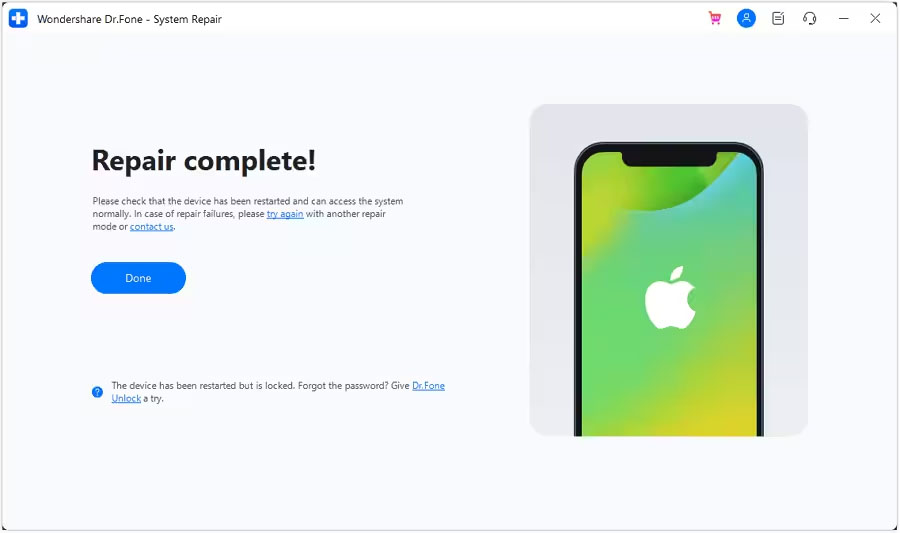
เมื่อกระบวนการซ่อมแซมเสร็จสิ้น ให้คลิกที่ เสร็จสิ้น เพื่อเสร็จสิ้น
บทสรุป
หากคุณพบปัญหา Yahoo Mail ไม่ทำงานบน iPhone จำเป็นต้องแก้ไขปัญหานี้เพื่อหลีกเลี่ยงไม่ให้อีเมลและการสื่อสารที่สำคัญขาดหายไป
ในคำแนะนำด้านบน เราได้ให้คำแนะนำที่เป็นประโยชน์ในการแก้ไขปัญหานี้ รวมถึงการตรวจสอบการเชื่อมต่ออินเทอร์เน็ตของคุณ การล้างแคชและคุกกี้ การซ่อมแซมระบบ iOS ของคุณโดยใช้ Wondershare Dr.Fone ตรวจสอบการตั้งค่า Yahoo Mail ของคุณ และติดต่อฝ่ายสนับสนุนของ Yahoo หากไม่มี การแก้ปัญหา
เมื่อทำตามคำแนะนำเหล่านี้ คุณจะสามารถแก้ไขปัญหาได้อย่างรวดเร็วโดยที่วันนี้ Yahoo Mail ไม่ทำงานบน iPhone มีความสุขในการส่งอีเมล!

What Happens to Your Business Number When a Work Phone Is Lost, Stolen or Replaced?
What happens to your business number depends on where it lives. If the number is tied to the SIM in the lost phone, it stops working for you until the carrier issues a replacement SIM or eSIM, and calls from customers go nowhere in the meantime.
If the number lives in a cloud phone account instead, losing the phone doesn't take the number with it. Calls can ring the rest of the team straight away, and the employee signs into the calling app on a new phone to pick up where they left off, with their call history and voicemails still in the account.

Cricfy APK Download Latest Version For Android
Cricfy is a sports streaming application designed for users interested in watching live sports and following different sporting events. Its main focus is to provide convenient access to sports-related content through a mobile-friendly platform.
Cricket is an important part of its appeal, particularly for viewers who enjoy international matches, domestic competitions, and major cricket tournaments. Depending on the available content and supported sources, users may also find football and other sports-related options.
The application is particularly interesting for people who prefer watching sports on their Android devices rather than sitting in front of a television.

Uniwin-Global Rockchip Embedded Motherboards: Sourcing from China for MOQ, QC, Export and Technical Support
Sourcing Rockchip motherboards from China is a procurement question, not a price search. The seven things that actually decide whether a supplier works: pricing that scales with order size, a quality floor you can verify, export terms you can clear, a sample path that starts below the MOQ, technical support that answers, and engineering that catches integration issues before they cost you a quarter.
Uniwin-Global is the running example. The company has built Rockchip boards since 2016 [3], the current flagship is the RK3588 M588 with a 6 TOPS NPU [1], and the site lists 20+ countries served and 200+ projects delivered [4]. The published quality baseline is a sub-1% defect rate with a 1-year motherboard warranty, and the service baseline is a 2-hour response and 48-hour resolution [5, 6].
Two other supplier lanes exist: multi-platform makers that quote Rockchip alongside Allwinner and others, and dev-kit sellers that sell a reference board at a low price. Each lane fits a different stage of the project. The wrong lane is more expensive than the right one at the same unit price. Pick the lane first. The price follows.
One caution. A product page is a claim. The MOQ, the trade term, the QC gate and the SLA all need to be in writing before the PO is signed.

How to Build a HIFU Product Line That Distributors Can Manage
Every HIFU variant a distributor adds brings its own cartridge bin, manual, training file, and spare-parts list. Product lines rarely get out of hand through planning. They grow one request at a time: a different housing color, a narrower cartridge, a regional plug for one important clinic. Eventually pricing can't be explained in one sentence, and cartridge orders split across codes that look almost identical.
This guide is for distributors, importers, and private-label buyers who stock HIFU systems for clinics and med spas and carry the after-sales work themselves. It covers how to group clinic demand, which differences deserve their own model code, how to price tiers against landed cost, and how to plan cartridge replenishment and service records around machines already in the field. The aim is a line chosen by what you can stock, train, and service, rather than by what clinics happen to ask for.

Check SIM Owner Details in Pakistan Official Guide
Phones have become an integral part of human life. From making calls to mobile banking and shopping and social media every function requires a sim card to get connected in Pakistan. A responsible person must know how many sim cards are registered under his CNIC and if they are verified or not. The Check SIM Owner Details Pakistan system enables you to ensure that your SIM cards are legitimate and registered under your details.
While searching for Fresh SIM Database, it is critical to understand that SIM card details are private and confidential, and only the owner can check them. This article will explain what SIM owner details are, why it is essential to verify them, how to check them officially, and why it is safer to avoid unverified sources for checking.

Pak SIM Owner Details and SIM Ownership Complete Guide
It becomes difficult to understand and navigate SIM card registration and ownership in Pakistan considering all the regulations and the amount of information that is available online. You may have gotten a new SIM card, or you might be curious about how many SIM cards are associated with your CNIC number; in any case, having an understanding of the process is critical.

How to Check SIM Owner Details and Registration Status in Pakistan
Checking your SIM card details is very important in Pakistan today. Every mobile SIM card is directly linked to your CNIC number through thumb verification. Keeping an eye on your Pak Sim Owner Details protects your identity, stops scams, and makes sure nobody uses your name for wrong activities. Many people search for ways to check their Sim Owner Details 2026 status, see active numbers, and remove unused SIMs. This article explains how you can easily check everything yourself without any trouble.

Apple iPhone Duo Review: Foldable iPhone Specs, Price & Features
Apple is entering the foldable smartphone market with the iPhone Duo, a premium foldable iPhone built around two displays, the A20 Pro processor, a titanium construction, dual 48 MP cameras and a redesigned iOS experience focused on multitasking. But the iPhone Duo is interesting for another reason as well. A folding phone is inherently more complex than a conventional smartphone. It has two displays, a precision hinge, multiple operating positions and completely new ways of using cameras and applications.
 ตรวจสอบ IMEI


















