ในปัจจุบันที่ทุกสิ่งทุกอย่างเป็นดิจิทัล กล่องจดหมายของเรามักจะล้นไปด้วยข้อมูลสำคัญต่างๆ ตั้งแต่ใบเสร็จรับเงินและการยืนยันการเดินทาง ไปจนถึงการอัปเดตโครงการและการติดต่อสื่อสารกับลูกค้า
ลองนึกดูว่ามันจะน่ารำคาญขนาดไหนหากคุณต้องส่งอีเมลสำคัญแต่ไม่สามารถดูได้เนื่องจากโปรแกรมไม่เข้ากันหรือการเชื่อมต่ออินเทอร์เน็ตไม่ดี วิธีแก้ไขที่รวดเร็วแต่ได้ผลวิธีหนึ่งคือการแปลงอีเมล Outlook ของคุณเป็นรูปแบบ PDF
ในทางกลับกัน การบันทึกอีเมล Outlook ลงใน PDF โดยใช้แนวทางปกติอาจต้องใช้แรงงานและใช้เวลานาน การพิมพ์อีเมลทุกฉบับด้วยตนเองเป็นเรื่องยุ่งยาก และการใช้ส่วนเสริมของบริษัทอื่นอาจทำให้เกิดความเสี่ยงด้านความปลอดภัยและความเข้ากันได้ โชคดีที่มีวิธีที่ดีกว่านี้! MultCloud โซลูชันบนคลาวด์ที่ล้ำสมัยที่ทำให้การแปลงอีเมล Outlook ของคุณเป็น PDF ง่ายขึ้น
MultCloud - เครื่องมือที่ดีที่สุดในการบันทึกอีเมล Outlook ลงใน PDF
ด้วยความช่วยเหลือของ MultCloud คุณสามารถบูรณาการและจัดการไฟล์ระหว่างผู้ให้บริการที่เก็บข้อมูลบนคลาวด์ที่แตกต่างกันได้อย่างง่ายดายด้วยอินเทอร์เฟซที่ใช้งานง่าย ความยุ่งยากที่เกี่ยวข้องกับการใช้เทคนิคการเก็บถาวรอีเมลแบบเดิมจะหมดไปด้วย MultCloud ขั้นตอนต่างๆ จะทำให้ง่ายขึ้นดังนี้:

การบูรณาการกับ Outlook ได้อย่างมีประสิทธิภาพ: คุณสามารถจัดการอีเมลของคุณได้โดยตรงภายใน MultCloud ด้วยการบูรณาการเข้ากับบัญชี Outlook ของคุณอย่างง่ายดาย ไม่จำเป็นต้องจัดการกับขั้นตอนการกำหนดค่าที่ยุ่งยากหรือดาวน์โหลดซอฟต์แวร์เพิ่มเติม
การแปลงเป็นชุดเพื่อประสิทธิภาพ: บอกลาการพิมพ์ด้วยมือซ้ำๆ ได้เลย! MultCloud ช่วยให้คุณสามารถเลือกและแปลงอีเมลหลายฉบับเป็น PDF ได้ในครั้งเดียว ถือเป็นเครื่องมือเปลี่ยนเกมสำหรับผู้ที่ต้องการจัดเก็บอีเมลจำนวนมากอย่างมีประสิทธิภาพ
ตัวเลือกการดาวน์โหลดที่ปรับแต่งได้เพื่อการควบคุม: ให้ความสำคัญกับการควบคุมด้วยตัวเลือกการดาวน์โหลดที่ปรับแต่งได้ของ MultCloud เลือกที่จะรวมไฟล์แนบใน PDF ของคุณหรือไม่รวมไฟล์แนบเหล่านี้เพื่อให้รูปแบบมีประสิทธิภาพมากขึ้น การควบคุมแบบละเอียดในระดับนี้ช่วยให้มั่นใจได้ว่าอีเมลที่เก็บถาวรของคุณจะตอบสนองความต้องการเฉพาะของคุณ
รองรับการใช้งานข้ามแพลตฟอร์ม : เนื่องจาก MultCloud เป็นระบบคลาวด์ จึงสามารถเข้าถึงได้จากอุปกรณ์ใดๆ ที่เชื่อมต่ออินเทอร์เน็ต ซึ่งช่วยให้มืออาชีพในยุคใหม่มีอิสระสูงสุดโดยให้คุณแปลงอีเมล Outlook เป็น PDF จากเดสก์ท็อป แล็ปท็อป แท็บเล็ต หรือแม้แต่สมาร์ทโฟน!
คู่มือทีละขั้นตอนในการบันทึกอีเมล Outlook เป็น PDF ด้วย MultCloud
ตอนนี้คุณเข้าใจประโยชน์ของ MultCloud แล้ว มาดูขั้นตอนที่เป็นมิตรกับผู้ใช้ในการแปลงอีเมล Outlook เป็น PDF กัน:
ส่วนที่ 1 การสมัครและเชื่อมต่อบัญชี Outlook ของคุณ
1. ไปที่เว็บไซต์ MultCloud และสร้างบัญชีฟรีโดยใช้ที่อยู่อีเมลที่คุณต้องการหรือเข้าสู่ระบบด้วย Google หรือ Facebook

2. เมื่อเข้าสู่ระบบแล้ว ให้ไปที่ส่วน " เพิ่มคลาวด์ " ที่นี่ คุณจะพบรายชื่อผู้ให้บริการที่เก็บข้อมูลบนคลาวด์ต่างๆ รวมถึง Outlook คลิกที่ ไอคอน Outlook เพื่อเริ่มกระบวนการผสานรวม
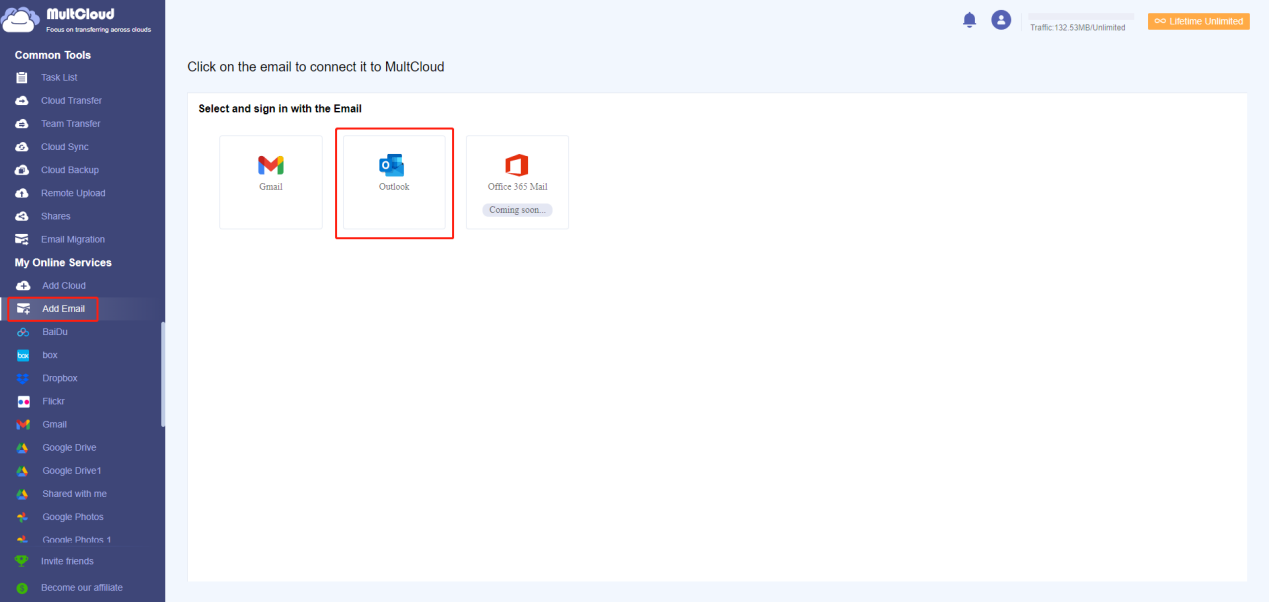
3. ทำตามคำแนะนำบนหน้าจอเพื่อให้ MultCloud เข้าถึงบัญชี Outlook ของคุณได้อย่างปลอดภัย ซึ่งโดยทั่วไปจะต้องป้อนข้อมูลประจำตัว Outlook ของคุณและให้สิทธิ์ที่จำเป็น
หมายเหตุ : คุณยังสามารถ สำรองอีเมล Google Workspace ลงในเครื่องหรือบนคลาวด์ได้หลังจากเพิ่ม Gmail ลงใน MultCloud
ส่วนที่ 2 การเลือกอีเมลสำหรับการแปลง (แบบเดี่ยวหรือแบบกลุ่ม)
1. โฟลเดอร์อีเมลของคุณจะปรากฏเป็นแบบมิเรอร์บน MultCloud เมื่อเชื่อมโยงกับบัญชี Outlook ของคุณ
2. สิ่งที่คุณต้องทำเพื่อแปลงอีเมลเดียวคือ เลือกอีเมลที่คุณต้องการเก็บรักษา นำทางไปยังโฟลเดอร์ที่ต้องการ แล้วคลิกขวาที่โฟลเดอร์นั้น
3. จากเมนูบริบท เลือกตัวเลือก " ดาวน์โหลด " ซึ่งจะเริ่มกระบวนการแปลงอีเมลเฉพาะนั้น
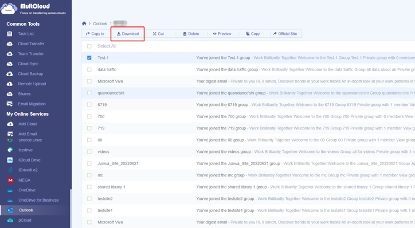
4. สำหรับการแปลงแบบแบตช์ ให้เลือก "เลือกทั้งหมด" เพื่อเลือกอีเมลทั้งหมดจากโฟลเดอร์ที่ต้องการ MultCloud อนุญาตให้คุณเลือกข้อความได้สูงสุด 200 ข้อความในแต่ละครั้ง
5. เมื่อคุณเลือกอีเมลทั้งหมดแล้ว ให้เลือก " ดาวน์โหลด " จากเมนู
ส่วนที่ 3 การปรับแต่งการตั้งค่าการดาวน์โหลด (รวมถึงไฟล์แนบ)
ก่อนที่จะเริ่มการดาวน์โหลด MultCloud เสนอตัวเลือกการปรับแต่งที่มีประโยชน์ดังต่อไปนี้:
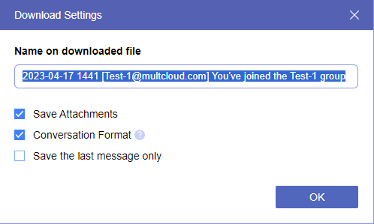
- บันทึกสิ่งที่แนบมา : เลือกว่าคุณต้องการรวมสิ่งที่แนบมาในไฟล์ PDF ที่ดาวน์โหลดหรือไม่รวมไว้สำหรับขนาดไฟล์ที่เล็กกว่า
- รูปแบบการแปลง : เนื้อหาที่อ้างอิงจะถูกลบออกเมื่อเปิดใช้งาน
- บันทึกเฉพาะข้อความสุดท้ายเท่านั้น : หลังจากเลือกตัวเลือกนี้แล้ว ระบบจะบันทึกเฉพาะข้อความสุดท้ายตามค่าเริ่มต้น
ส่วนที่ 4 การเริ่มกระบวนการดาวน์โหลดและการบันทึกไฟล์ PDF ของคุณ
- เมื่อคุณตรวจสอบและปรับเปลี่ยนการตั้งค่าการดาวน์โหลดตามความต้องการของคุณแล้ว ให้คลิกปุ่ม "ตกลง"
- กระบวนการนี้อาจใช้เวลาไม่กี่วินาทีหรือไม่กี่นาที ขึ้นอยู่กับจำนวนอีเมลที่คุณกำลังแปลง MultCloud จะแจ้งให้คุณทราบเมื่อการแปลงเสร็จสมบูรณ์
- ไปที่โฟลเดอร์ดาวน์โหลดที่กำหนดไว้บนอุปกรณ์ของคุณเพื่อเข้าถึงไฟล์ PDF ที่เพิ่งแปลงใหม่ ตอนนี้คุณจะมีสำเนาอีเมล Outlook ที่สำคัญที่จัดระเบียบและเข้าถึงได้อย่างง่ายดาย
เหนือกว่าพื้นฐาน: คุณสมบัติขั้นสูงของ MultCloud
MultCloud ไม่เพียงแต่เสนอบริการแปลงอีเมลเป็น PDF เท่านั้น แต่ยังมีฟีเจอร์ขั้นสูงบางส่วนที่จะช่วยยกระดับประสบการณ์การจัดการพื้นที่เก็บข้อมูลบนคลาวด์ของคุณ:
- การโอนอีเมลระหว่างผู้ให้บริการที่เก็บข้อมูลบนคลาวด์หลายราย : คุณใช้บริการที่เก็บข้อมูลบนคลาวด์หลายรายการ เช่น Dropbox และ Google Drive หรือไม่ MultCloud ช่วยให้คุณโอนอีเมล (และไฟล์อื่นๆ) ระหว่างแพลตฟอร์มเหล่านี้ได้อย่างราบรื่น ซึ่งจะช่วยขจัดความจำเป็นในการเข้าสู่ระบบหลายบัญชีพร้อมกัน และทำให้ระบบนิเวศที่เก็บข้อมูลบนคลาวด์ของคุณเรียบง่ายขึ้น
- การกำหนดเวลาการสำรองข้อมูลอัตโนมัติเพื่อความสบายใจ : รับรองว่าอีเมลสำคัญของคุณจะไม่สูญหายด้วยฟีเจอร์การกำหนดเวลาการสำรองข้อมูลอัตโนมัติของ MultCloud ตั้งค่าการสำรองข้อมูลอัตโนมัติเป็นระยะๆ เพื่อสร้างสำเนาอีเมลที่ปลอดภัยและซ้ำซ้อนบนคลาวด์ ซึ่งจะช่วยเพิ่มระดับการป้องกันพิเศษเพื่อป้องกันการลบโดยไม่ได้ตั้งใจหรือการสูญเสียข้อมูล
คุณสมบัติขั้นสูงเหล่านี้แสดงให้เห็นถึงความสามารถของ MultCloud ที่มากกว่าการแปลงอีเมลแบบธรรมดา โดย MultCloud ถือเป็นโซลูชันการจัดการคลาวด์ที่ครอบคลุมซึ่งตอบสนองความต้องการของผู้ใช้ที่ต้องการแนวทางที่แข็งแกร่งกว่าในการจัดระเบียบและรักษาความปลอดภัยข้อมูล
บทสรุป
MultCloud ช่วยให้คุณสามารถเอาชนะความยุ่งวุ่นวายของกล่องจดหมายที่ล้นหลามได้ด้วยการเสนอโซลูชันที่คล่องตัวและมีประสิทธิภาพสำหรับการแปลงอีเมล Outlook ของคุณเป็น PDF หมดยุคของการพิมพ์ด้วยมือที่น่าเบื่อหน่ายหรือการดิ้นรนกับส่วนเสริมของบุคคลที่สาม ด้วย MultCloud คุณจะสามารถ:
- บูรณาการอย่างราบรื่นกับบัญชี Outlook ของคุณเพื่อการจัดการอีเมลที่ง่ายดาย
- แปลงอีเมลเดี่ยวหรือชุดในครั้งเดียว ช่วยประหยัดเวลาอันมีค่าของคุณ
- ปรับแต่งตัวเลือกการดาวน์โหลดเพื่อให้แน่ใจว่า PDF ของคุณตอบโจทย์ความต้องการเฉพาะของคุณ
- เข้าถึงไฟล์ PDF ที่แปลงแล้วจากอุปกรณ์ใดก็ได้ที่มีการเชื่อมต่ออินเทอร์เน็ต เพิ่มความยืดหยุ่นสูงสุด

What Happens to Your Business Number When a Work Phone Is Lost, Stolen or Replaced?
What happens to your business number depends on where it lives. If the number is tied to the SIM in the lost phone, it stops working for you until the carrier issues a replacement SIM or eSIM, and calls from customers go nowhere in the meantime.
If the number lives in a cloud phone account instead, losing the phone doesn't take the number with it. Calls can ring the rest of the team straight away, and the employee signs into the calling app on a new phone to pick up where they left off, with their call history and voicemails still in the account.

Cricfy APK Download Latest Version For Android
Cricfy is a sports streaming application designed for users interested in watching live sports and following different sporting events. Its main focus is to provide convenient access to sports-related content through a mobile-friendly platform.
Cricket is an important part of its appeal, particularly for viewers who enjoy international matches, domestic competitions, and major cricket tournaments. Depending on the available content and supported sources, users may also find football and other sports-related options.
The application is particularly interesting for people who prefer watching sports on their Android devices rather than sitting in front of a television.

Uniwin-Global Rockchip Embedded Motherboards: Sourcing from China for MOQ, QC, Export and Technical Support
Sourcing Rockchip motherboards from China is a procurement question, not a price search. The seven things that actually decide whether a supplier works: pricing that scales with order size, a quality floor you can verify, export terms you can clear, a sample path that starts below the MOQ, technical support that answers, and engineering that catches integration issues before they cost you a quarter.
Uniwin-Global is the running example. The company has built Rockchip boards since 2016 [3], the current flagship is the RK3588 M588 with a 6 TOPS NPU [1], and the site lists 20+ countries served and 200+ projects delivered [4]. The published quality baseline is a sub-1% defect rate with a 1-year motherboard warranty, and the service baseline is a 2-hour response and 48-hour resolution [5, 6].
Two other supplier lanes exist: multi-platform makers that quote Rockchip alongside Allwinner and others, and dev-kit sellers that sell a reference board at a low price. Each lane fits a different stage of the project. The wrong lane is more expensive than the right one at the same unit price. Pick the lane first. The price follows.
One caution. A product page is a claim. The MOQ, the trade term, the QC gate and the SLA all need to be in writing before the PO is signed.

How to Build a HIFU Product Line That Distributors Can Manage
Every HIFU variant a distributor adds brings its own cartridge bin, manual, training file, and spare-parts list. Product lines rarely get out of hand through planning. They grow one request at a time: a different housing color, a narrower cartridge, a regional plug for one important clinic. Eventually pricing can't be explained in one sentence, and cartridge orders split across codes that look almost identical.
This guide is for distributors, importers, and private-label buyers who stock HIFU systems for clinics and med spas and carry the after-sales work themselves. It covers how to group clinic demand, which differences deserve their own model code, how to price tiers against landed cost, and how to plan cartridge replenishment and service records around machines already in the field. The aim is a line chosen by what you can stock, train, and service, rather than by what clinics happen to ask for.

Check SIM Owner Details in Pakistan Official Guide
Phones have become an integral part of human life. From making calls to mobile banking and shopping and social media every function requires a sim card to get connected in Pakistan. A responsible person must know how many sim cards are registered under his CNIC and if they are verified or not. The Check SIM Owner Details Pakistan system enables you to ensure that your SIM cards are legitimate and registered under your details.
While searching for Fresh SIM Database, it is critical to understand that SIM card details are private and confidential, and only the owner can check them. This article will explain what SIM owner details are, why it is essential to verify them, how to check them officially, and why it is safer to avoid unverified sources for checking.

Pak SIM Owner Details and SIM Ownership Complete Guide
It becomes difficult to understand and navigate SIM card registration and ownership in Pakistan considering all the regulations and the amount of information that is available online. You may have gotten a new SIM card, or you might be curious about how many SIM cards are associated with your CNIC number; in any case, having an understanding of the process is critical.

How to Check SIM Owner Details and Registration Status in Pakistan
Checking your SIM card details is very important in Pakistan today. Every mobile SIM card is directly linked to your CNIC number through thumb verification. Keeping an eye on your Pak Sim Owner Details protects your identity, stops scams, and makes sure nobody uses your name for wrong activities. Many people search for ways to check their Sim Owner Details 2026 status, see active numbers, and remove unused SIMs. This article explains how you can easily check everything yourself without any trouble.

Apple iPhone Duo Review: Foldable iPhone Specs, Price & Features
Apple is entering the foldable smartphone market with the iPhone Duo, a premium foldable iPhone built around two displays, the A20 Pro processor, a titanium construction, dual 48 MP cameras and a redesigned iOS experience focused on multitasking. But the iPhone Duo is interesting for another reason as well. A folding phone is inherently more complex than a conventional smartphone. It has two displays, a precision hinge, multiple operating positions and completely new ways of using cameras and applications.
 ตรวจสอบ IMEI


















