สำหรับแฟนเพลง ไฟล์ MP3 ไม่ใช่สิ่งที่ไม่รู้จัก การแก้ไขไฟล์ MP3 บนคอมพิวเตอร์ของคุณ หรือหลังจากดาวน์โหลดเพลงโปรดเพื่อให้ได้ผลลัพธ์ที่ต้องการ การถ่ายโอนข้อมูลจากพีซีไปยัง iPhone อาจเป็นเรื่องยาก
เนื่องจากปัญหาความเข้ากันได้ระหว่างอุปกรณ์ Windows และ iOS การย้ายไฟล์ข้ามแพลตฟอร์มทั้งสองนี้จึงไม่เหมือนกับการถ่ายโอนจาก Mac ไปยัง iPhone ผู้ใช้มักจะใช้ iTunes เพื่อซิงค์ไฟล์
ทำไมคุณต้องถ่ายโอน mp3 ไปยัง iPhone โดยไม่มี iTunes
อย่างไรก็ตาม ในฐานะซอฟต์แวร์อย่างเป็นทางการของ Apple iTunes จะยังคงทำงานบน Windows ต่อไป และจะมีปัญหาและข้อผิดพลาดที่คาดไม่ถึงซึ่งอาจขัดขวางกระบวนการถ่ายโอน สำหรับผู้ใช้ส่วนใหญ่ การออกแบบ iTunes นั้นใช้งานง่ายและอินเทอร์เฟซนั้นก็พกพาสะดวก ทำให้กระบวนการถ่ายโอนเป็นเรื่องปกติมากขึ้น
นอกจากนี้ iTunes รองรับการถ่ายโอนไฟล์ฝ่ายเดียวเท่านั้น และการถ่ายโอนไฟล์จาก iPhone ไปยังพีซีนั้นมีความหลากหลายมาก ดังนั้นจึงเป็นเรื่องสำคัญที่จะต้องหาวิธีถ่ายโอนไฟล์ MP3 จากพีซีไปยัง iPhone โดยไม่ต้องใช้ iTunes
ซอฟต์แวร์ที่ดีที่สุดสำหรับการถ่ายโอน MP3 จากพีซีไปยัง iPhone โดยไม่ต้องใช้ iTunes
หากคุณต้องการถ่ายโอนไฟล์ MP3 จากพีซีของคุณไปยัง iPhone ซอฟต์แวร์ ถ่ายโอนข้อมูล iPhone มืออาชีพ - FoneTool จะเป็นผู้ช่วยที่ดีที่สุดของคุณ
ความเร็วการถ่ายโอนที่รวดเร็วเป็นพิเศษ: FoneTool ให้ความสำคัญกับอัตราการถ่ายโอนที่สูงกว่าซอฟต์แวร์อื่นๆ ในอุตสาหกรรม ถ่ายโอนไฟล์เพลงนับพันไฟล์ไปยัง iPhone ในไม่กี่นาที
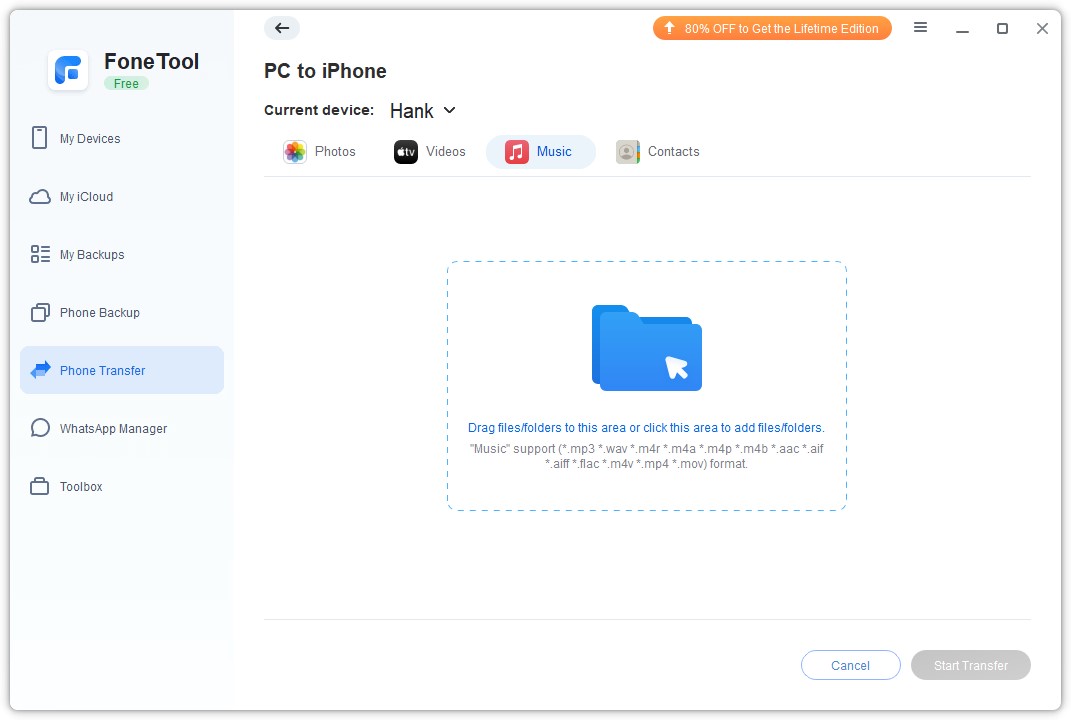
แสดงไฟล์เพลงประเภทต่างๆ : FoneTool มีการจดจำไฟล์ที่มีประสิทธิภาพ ซึ่งสามารถระบุรูปแบบเพลงทั่วไปที่ใช้ในชีวิตประจำวัน ค้นคว้า และทำงาน เช่น mp3, m4a, m4b,m4p, M4r, aif, aiff, flac, wav ได้อย่างง่ายดาย , aac ซึ่งช่วยให้ผู้ใช้ค้นหาไฟล์ที่ต้องการ
การเชื่อมต่อ USB ที่ปลอดภัย: FoneTool ใช้เฉพาะสาย USB ในการรับส่งข้อมูล และรับประกันว่าข้อมูลจะไม่รั่วไหล คุณสามารถถ่ายโอนข้อมูลได้อย่างเต็มประสิทธิภาพ ต่างจาก iTunes ที่มีความแตกต่างหรือข้อผิดพลาดทั่วไประหว่างการใช้งาน FoneTool ทำงานบนระบบ Windows ที่แตกต่างกัน และไม่มีการโต้ตอบมากนัก ให้การถ่ายโอนที่มีประสิทธิภาพและประหยัดเวลาสำหรับผู้ใช้ได้มาก
ถ่ายโอนข้อมูลมากกว่าหนึ่งประเภท: คุณสามารถส่งภาพถ่าย วิดีโอ และรายชื่อติดต่อจาก iPhone, PC จาก iPhone หรือจาก iPhone ไปยัง iPhone ผ่านเพลงได้
ความเข้ากันได้ดีเยี่ยม : FoneTool รองรับอุปกรณ์และระบบ iOS ที่หลากหลาย รวมถึงอุปกรณ์ล่าสุด เพื่อให้เข้ากันได้กับเสียง
คุณสมบัติอันทรงพลัง: นอกเหนือจากการถ่ายโอนข้อมูลไปยัง iPhone แล้ว FoneTool ยังช่วยให้คุณสำรองข้อมูล iPhone, สำรองข้อมูล WhatsApp, จัดการข้อมูลใน iCloud และสแกนและย้ายสำเนารูปภาพไปยัง iPhone หรือคอมพิวเตอร์
หลังจากศึกษาเกี่ยวกับคุณสมบัติและคุณประโยชน์มากมายของ FoneTool วิธีถ่ายโอน MP3 ไปยัง iPhone โดยไม่ต้องใช้ iTunes คุณสามารถเริ่มอ่านตอนนี้เพื่อเรียนรู้วิธีใช้ FoneTool เพื่อ ถ่ายโอน MP3 ไปยัง iPhone โดยไม่ต้องใช้ iTunes กระบวนการที่เรียบง่ายและมีประสิทธิภาพนี้ทำให้แน่ใจว่าคุณพอใจมากที่จะใช้ FoneTool ตามความต้องการในการถ่ายโอนของคุณ
ขั้นตอนที่ 1 ดาวน์โหลด FoneTool บนพีซี Windows ของคุณ > เชื่อมต่อ iPhone เข้ากับคอมพิวเตอร์ผ่านสาย USB ที่เชื่อถือได้ > เมื่อฉันกลับมาที่ UP ฉันจะเริ่มสร้างฉันใหม่
ขั้นตอนที่ 2 . เปิด FoneTool > ไปที่การถ่ายโอนโทรศัพท์ > เลือกพีซีไปยัง iPhone และคลิกที่เริ่มต้นเพื่อดำเนินการต่อ
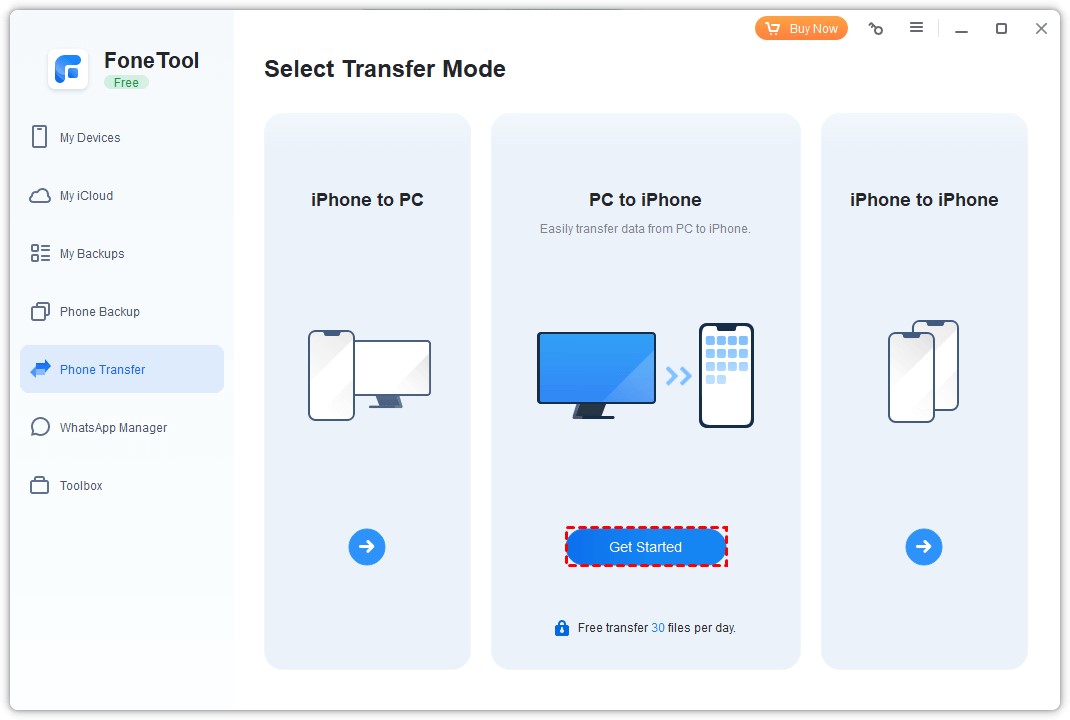
ขั้นตอนที่ 3 ลากและวางไฟล์โปรดของคุณลงในกล่องโดยตรง
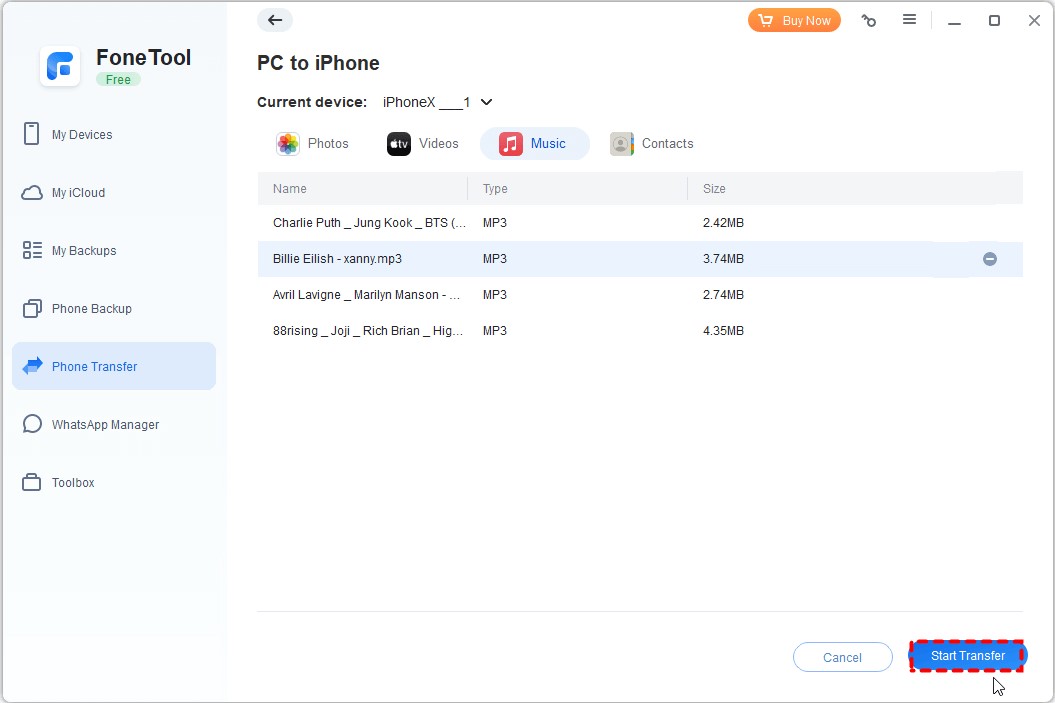
ขั้นตอนที่ 4 ยืนยันข้อมูลที่คุณต้องการย้าย > คลิกปุ่มเริ่มการถ่ายโอนเพื่อเริ่มต้น
จากขั้นตอนโดยละเอียด ตอนนี้คุณสามารถทราบวิธีการถ่ายโอน MP3 ระหว่างพีซีและ iPhone ของคุณให้เสร็จสิ้นได้อย่างมีประสิทธิภาพ หากคุณต้องการถ่ายโอนไฟล์จาก iPhone ไปยังพีซี คุณยังสามารถเลือกตัวเลือก iPhone ไปยังพีซีภายใต้อินเทอร์เฟซการโอนโทรศัพท์เพื่อเสร็จสิ้นกระบวนการ
บทสรุป
ตอนนี้คุณสามารถเห็นแล้วว่าทำไม FoneTool จึงเป็นซอฟต์แวร์ถ่ายโอนข้อมูล iPhone ที่ดีที่สุด ด้วยขั้นตอนง่ายๆ เพียงไม่กี่ขั้นตอน คุณก็สามารถถ่ายโอนข้อมูลจากพีซีไปยัง iPhone ของคุณได้ นอกจากเพลงแล้ว คุณยังสามารถถ่ายโอนรูปภาพ วิดีโอ รายชื่อติดต่อ และอื่นๆ ได้อีกด้วย
หากจำเป็น คุณสามารถใช้คุณสมบัติการสำรองข้อมูลโทรศัพท์เพื่อสำรองข้อมูลโทรศัพท์ของคุณบางส่วนหรือทั้งหมดได้อย่างง่ายดาย พัฒนาโดยทีมงานมากประสบการณ์ที่ทุ่มเทให้กับความปลอดภัยของข้อมูล FoneTool ได้รับความไว้วางใจจากผู้ใช้มากกว่า 3 ล้านคนทั่วโลก และแน่นอนว่าจะได้รับการอนุมัติจากคุณเช่นกัน! เพียงแค่ลองตอนนี้!

What Happens to Your Business Number When a Work Phone Is Lost, Stolen or Replaced?
What happens to your business number depends on where it lives. If the number is tied to the SIM in the lost phone, it stops working for you until the carrier issues a replacement SIM or eSIM, and calls from customers go nowhere in the meantime.
If the number lives in a cloud phone account instead, losing the phone doesn't take the number with it. Calls can ring the rest of the team straight away, and the employee signs into the calling app on a new phone to pick up where they left off, with their call history and voicemails still in the account.

Cricfy APK Download Latest Version For Android
Cricfy is a sports streaming application designed for users interested in watching live sports and following different sporting events. Its main focus is to provide convenient access to sports-related content through a mobile-friendly platform.
Cricket is an important part of its appeal, particularly for viewers who enjoy international matches, domestic competitions, and major cricket tournaments. Depending on the available content and supported sources, users may also find football and other sports-related options.
The application is particularly interesting for people who prefer watching sports on their Android devices rather than sitting in front of a television.

Uniwin-Global Rockchip Embedded Motherboards: Sourcing from China for MOQ, QC, Export and Technical Support
Sourcing Rockchip motherboards from China is a procurement question, not a price search. The seven things that actually decide whether a supplier works: pricing that scales with order size, a quality floor you can verify, export terms you can clear, a sample path that starts below the MOQ, technical support that answers, and engineering that catches integration issues before they cost you a quarter.
Uniwin-Global is the running example. The company has built Rockchip boards since 2016 [3], the current flagship is the RK3588 M588 with a 6 TOPS NPU [1], and the site lists 20+ countries served and 200+ projects delivered [4]. The published quality baseline is a sub-1% defect rate with a 1-year motherboard warranty, and the service baseline is a 2-hour response and 48-hour resolution [5, 6].
Two other supplier lanes exist: multi-platform makers that quote Rockchip alongside Allwinner and others, and dev-kit sellers that sell a reference board at a low price. Each lane fits a different stage of the project. The wrong lane is more expensive than the right one at the same unit price. Pick the lane first. The price follows.
One caution. A product page is a claim. The MOQ, the trade term, the QC gate and the SLA all need to be in writing before the PO is signed.

How to Build a HIFU Product Line That Distributors Can Manage
Every HIFU variant a distributor adds brings its own cartridge bin, manual, training file, and spare-parts list. Product lines rarely get out of hand through planning. They grow one request at a time: a different housing color, a narrower cartridge, a regional plug for one important clinic. Eventually pricing can't be explained in one sentence, and cartridge orders split across codes that look almost identical.
This guide is for distributors, importers, and private-label buyers who stock HIFU systems for clinics and med spas and carry the after-sales work themselves. It covers how to group clinic demand, which differences deserve their own model code, how to price tiers against landed cost, and how to plan cartridge replenishment and service records around machines already in the field. The aim is a line chosen by what you can stock, train, and service, rather than by what clinics happen to ask for.

Check SIM Owner Details in Pakistan Official Guide
Phones have become an integral part of human life. From making calls to mobile banking and shopping and social media every function requires a sim card to get connected in Pakistan. A responsible person must know how many sim cards are registered under his CNIC and if they are verified or not. The Check SIM Owner Details Pakistan system enables you to ensure that your SIM cards are legitimate and registered under your details.
While searching for Fresh SIM Database, it is critical to understand that SIM card details are private and confidential, and only the owner can check them. This article will explain what SIM owner details are, why it is essential to verify them, how to check them officially, and why it is safer to avoid unverified sources for checking.

Pak SIM Owner Details and SIM Ownership Complete Guide
It becomes difficult to understand and navigate SIM card registration and ownership in Pakistan considering all the regulations and the amount of information that is available online. You may have gotten a new SIM card, or you might be curious about how many SIM cards are associated with your CNIC number; in any case, having an understanding of the process is critical.

How to Check SIM Owner Details and Registration Status in Pakistan
Checking your SIM card details is very important in Pakistan today. Every mobile SIM card is directly linked to your CNIC number through thumb verification. Keeping an eye on your Pak Sim Owner Details protects your identity, stops scams, and makes sure nobody uses your name for wrong activities. Many people search for ways to check their Sim Owner Details 2026 status, see active numbers, and remove unused SIMs. This article explains how you can easily check everything yourself without any trouble.

Apple iPhone Duo Review: Foldable iPhone Specs, Price & Features
Apple is entering the foldable smartphone market with the iPhone Duo, a premium foldable iPhone built around two displays, the A20 Pro processor, a titanium construction, dual 48 MP cameras and a redesigned iOS experience focused on multitasking. But the iPhone Duo is interesting for another reason as well. A folding phone is inherently more complex than a conventional smartphone. It has two displays, a precision hinge, multiple operating positions and completely new ways of using cameras and applications.
 ตรวจสอบ IMEI


















