แอป Google ขัดข้อง บนโทรศัพท์ Android ของคุณหรือไม่ ถ้าใช่ คุณมาถูกที่แล้ว ผู้ใช้ Android จำนวนมากทั่วโลกประสบปัญหาการ ขัดข้องของแอปพลิเคชัน ในแอปพลิเคชัน Google อย่างเป็นทางการ เนื่องจากสาเหตุมาจากการ อัปเดตแอป Google ที่ล้มเหลว หากคุณเห็นข้อผิดพลาด "Google หยุดทำงาน" บนโทรศัพท์ Android ของคุณ เราได้เตรียมคำแนะนำทีละขั้นตอนที่คุณสามารถปฏิบัติตามเพื่อ แก้ไขข้อขัดข้องของแอป Google ได้ใน ขณะนี้

Google เช่นเดียวกับแอปพลิเคชันอื่นๆ ที่ติดตั้งบน สมาร์ทโฟน อาจทำให้เกิดปัญหา ซึ่งหมายความว่าแอปพลิเคชันเหล่านั้นหยุดทำงาน ปิดโดยพลการ หรือสะดุดเนื่องจากการอัปเดตล่าสุด ซึ่งไม่ได้ให้ผลลัพธ์ที่เป็นประโยชน์เสมอไป Google App Crash เป็นหนึ่งในข้อพิสูจน์ว่าการอัปเดตสามารถทำให้เกิดปัญหาได้มากมาย โชคดีที่ปัญหา ของแอป Google ไม่ทำงาน สามารถแก้ไขได้อย่างรวดเร็วและง่ายดาย อยู่กับเราจนจบและหาวิธีจัดการกับปัญหานี้
ที่เกี่ยวข้อง: จะเปลี่ยนเสียง Google Assistant ได้อย่างไร?
1. แก้ไขปัญหาการขัดข้องของแอป Google
ปัญหาความล้มเหลวของ Google เริ่มต้นขึ้นหลังจากการอัปเดตครั้งล่าสุดแต่ไม่จำกัดเพียงเวอร์ชันเดียว เวอร์ชันของแอปพลิเคชันอาจแตกต่างกันไปตามอุปกรณ์ต่างๆ ผู้ใช้ประสบปัญหาข้อขัดข้องของ แอป Google เวอร์ชัน 12.23.16.23, 12.22.8.23 และ 12.24.7.29 (เบต้า) บนอุปกรณ์จาก OEM หลายราย รวมถึงกลุ่มผลิตภัณฑ์ Pixel, Samsung , Xiaomi , Motorola และอื่นๆ
วิธีที่ง่ายที่สุดในการแก้ไขปัญหาเกี่ยวกับความล้มเหลวของ Google คือการล้างข้อมูล อันที่จริง นี่คือสิ่งที่ Google แนะนำอย่างเป็นทางการให้คุณแก้ไขปัญหา หรือคุณสามารถถอนการติดตั้ง Google App Updates เนื่องจากปัญหาเกิดจากการอัปเดตใหม่ที่มีข้อผิดพลาด ตราบใดที่ Google ไม่ได้แนะนำการอัปเดตใหม่ที่จะแก้ปัญหาความล้มเหลว คุณสามารถทำตามขั้นตอนเหล่านี้ได้ โปรดทราบว่ากระบวนการนี้จะรีเซ็ตการตั้งค่า Google ของคุณ
2. ล้างข้อมูลแอป Google เพื่อแก้ไขปัญหาข้อขัดข้อง
1. ในตอนเริ่มต้น ให้ปลดล็อกหน้าจอ โทรศัพท์ Android ของคุณและค้นหา แอป Google กดปุ่ม i (ข้อมูลแอป) ค้างไว้เพื่อเข้าสู่หน้า การตั้งค่าแอป Google คุณสามารถเข้าถึงหน้านี้ด้วยวิธีที่สองและไปที่
การตั้งค่า -> แอปและการแจ้งเตือน -> ดูแอปทั้งหมด -> Google

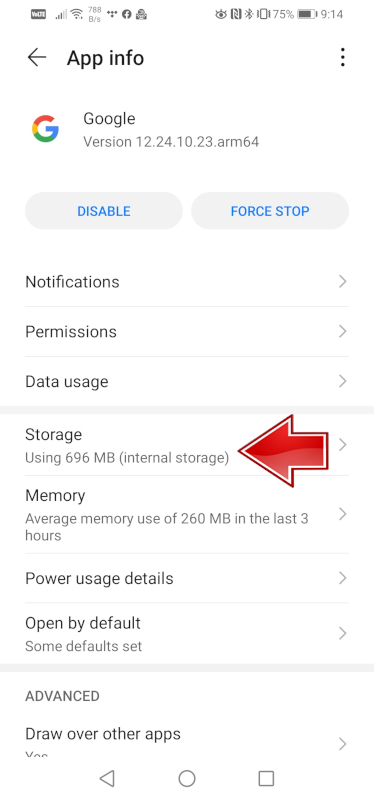
2. ใน หน้าการตั้งค่าแอป Google ให้แตะที่ เก็บข้อมูลและแคช เมื่อ หน้าจอ Storage and Cache Management ปรากฏขึ้น ให้แตะ Manage Space ในอุปกรณ์บางเครื่อง คุณอาจเห็นปุ่ม " ลบพื้นที่เก็บข้อมูล" แทน "จัดการพื้นที่ " นี่ไม่ใช่สิ่งที่คุณควรกังวล แตะที่ Manage Space หรือ Clear Storage เพื่อดำเนินการต่อ

3. จากนั้นแตะ ล้างข้อมูลทั้งหมด แล้วกด ตกลง บนข้อความเตือนเพื่อยืนยันการกระทำของคุณ การดำเนินการนี้ควรแก้ไขปัญหาเกี่ยวกับความล้มเหลวของ แอป Google บนอุปกรณ์ Android ของคุณและคุณสามารถใช้แอปพลิเคชันนี้ได้


3. ถอนการติดตั้ง Google App Updates
อีกวิธีในการแก้ไข ข้อผิดพลาดแอป Google ที่ น่ารำคาญคือการ ถอนการติดตั้งการอัปเดตล่าสุด ที่ทำให้เกิดปัญหา
นี่คือวิธีการ:
1. ค้นหา แอป Google บนโทรศัพท์ของคุณ กดปุ่ม I (ข้อมูลแอป) ค้างไว้เพื่อเข้าสู่ หน้าการตั้งค่าแอป Google หรือคุณสามารถไปที่
การตั้งค่า -> แอปและการแจ้งเตือน -> ดูแอปทั้งหมด -> Google
2. แตะเมนู สามจุดที่แนวตั้งที่ มุมบนขวาของ หน้าการตั้งค่าแอป Google แล้วกด ถอนการติดตั้งการอัปเดต จากนั้นกด ตกลง เพื่อยืนยัน แอปควรหยุดค้างแล้ว หากตัวเลือกนี้ใช้ไม่ได้ผล คุณสามารถทำตามวิธีการด้านบนเพื่อ ล้างข้อมูลแอป Google 

เราขอแนะนำให้คุณหลีกเลี่ยงการอัปเดตแอป Google เป็นเวอร์ชันล่าสุดจนกว่าบริษัทจะแก้ไขปัญหาได้
4. ทำการซอฟต์รีบูต
คุณสามารถลองใช้ Soft Reboot เพื่อหยุดการขัดข้องได้ กดปุ่มเปิดปิดค้างไว้ 30 วินาทีแล้วรอให้โทรศัพท์รีสตาร์ท เมื่อคุณเปิด แอป Google หลังจากรีสตาร์ทแล้ว ไม่ควรบังคับอีกต่อไป ด้านล่างนี้คุณจะพบวิดีโอเกี่ยวกับวิธีการดำเนินการให้เสร็จสิ้น
คุณสามารถหาวิดีโอเพิ่มเติมเกี่ยวกับซอฟต์รีบูตได้ ที่นี่
หยุดแอป Google หยุดทำงานบนโทรศัพท์ Android
ด้วยวิธีนี้ คุณสามารถหยุดการขัดข้องของ แอป Google บนอุปกรณ์ Android ของคุณ เมื่อพิจารณาว่าการอัปเดตมีผลกับ ผู้ใช้ Android ทั่วโลกอย่างไร เราสามารถคาดหวังได้ว่าบริษัทจะออกอัปเดตใหม่ที่จะแก้ไขปัญหานี้ได้ในไม่ช้า อันที่จริง แอปพลิเคชัน Google เวอร์ชันเบต้า ล่าสุดที่มีให้ใน 12.24 Play Store มีการแก้ไขข้อผิดพลาด และควรได้รับการแนะนำให้รู้จักกับเวอร์ชันเสถียรในเร็วๆ นี้
ตามเรามา





What Happens to Your Business Number When a Work Phone Is Lost, Stolen or Replaced?
What happens to your business number depends on where it lives. If the number is tied to the SIM in the lost phone, it stops working for you until the carrier issues a replacement SIM or eSIM, and calls from customers go nowhere in the meantime.
If the number lives in a cloud phone account instead, losing the phone doesn't take the number with it. Calls can ring the rest of the team straight away, and the employee signs into the calling app on a new phone to pick up where they left off, with their call history and voicemails still in the account.

Cricfy APK Download Latest Version For Android
Cricfy is a sports streaming application designed for users interested in watching live sports and following different sporting events. Its main focus is to provide convenient access to sports-related content through a mobile-friendly platform.
Cricket is an important part of its appeal, particularly for viewers who enjoy international matches, domestic competitions, and major cricket tournaments. Depending on the available content and supported sources, users may also find football and other sports-related options.
The application is particularly interesting for people who prefer watching sports on their Android devices rather than sitting in front of a television.

Uniwin-Global Rockchip Embedded Motherboards: Sourcing from China for MOQ, QC, Export and Technical Support
Sourcing Rockchip motherboards from China is a procurement question, not a price search. The seven things that actually decide whether a supplier works: pricing that scales with order size, a quality floor you can verify, export terms you can clear, a sample path that starts below the MOQ, technical support that answers, and engineering that catches integration issues before they cost you a quarter.
Uniwin-Global is the running example. The company has built Rockchip boards since 2016 [3], the current flagship is the RK3588 M588 with a 6 TOPS NPU [1], and the site lists 20+ countries served and 200+ projects delivered [4]. The published quality baseline is a sub-1% defect rate with a 1-year motherboard warranty, and the service baseline is a 2-hour response and 48-hour resolution [5, 6].
Two other supplier lanes exist: multi-platform makers that quote Rockchip alongside Allwinner and others, and dev-kit sellers that sell a reference board at a low price. Each lane fits a different stage of the project. The wrong lane is more expensive than the right one at the same unit price. Pick the lane first. The price follows.
One caution. A product page is a claim. The MOQ, the trade term, the QC gate and the SLA all need to be in writing before the PO is signed.

How to Build a HIFU Product Line That Distributors Can Manage
Every HIFU variant a distributor adds brings its own cartridge bin, manual, training file, and spare-parts list. Product lines rarely get out of hand through planning. They grow one request at a time: a different housing color, a narrower cartridge, a regional plug for one important clinic. Eventually pricing can't be explained in one sentence, and cartridge orders split across codes that look almost identical.
This guide is for distributors, importers, and private-label buyers who stock HIFU systems for clinics and med spas and carry the after-sales work themselves. It covers how to group clinic demand, which differences deserve their own model code, how to price tiers against landed cost, and how to plan cartridge replenishment and service records around machines already in the field. The aim is a line chosen by what you can stock, train, and service, rather than by what clinics happen to ask for.

Check SIM Owner Details in Pakistan Official Guide
Phones have become an integral part of human life. From making calls to mobile banking and shopping and social media every function requires a sim card to get connected in Pakistan. A responsible person must know how many sim cards are registered under his CNIC and if they are verified or not. The Check SIM Owner Details Pakistan system enables you to ensure that your SIM cards are legitimate and registered under your details.
While searching for Fresh SIM Database, it is critical to understand that SIM card details are private and confidential, and only the owner can check them. This article will explain what SIM owner details are, why it is essential to verify them, how to check them officially, and why it is safer to avoid unverified sources for checking.

Pak SIM Owner Details and SIM Ownership Complete Guide
It becomes difficult to understand and navigate SIM card registration and ownership in Pakistan considering all the regulations and the amount of information that is available online. You may have gotten a new SIM card, or you might be curious about how many SIM cards are associated with your CNIC number; in any case, having an understanding of the process is critical.

How to Check SIM Owner Details and Registration Status in Pakistan
Checking your SIM card details is very important in Pakistan today. Every mobile SIM card is directly linked to your CNIC number through thumb verification. Keeping an eye on your Pak Sim Owner Details protects your identity, stops scams, and makes sure nobody uses your name for wrong activities. Many people search for ways to check their Sim Owner Details 2026 status, see active numbers, and remove unused SIMs. This article explains how you can easily check everything yourself without any trouble.

Apple iPhone Duo Review: Foldable iPhone Specs, Price & Features
Apple is entering the foldable smartphone market with the iPhone Duo, a premium foldable iPhone built around two displays, the A20 Pro processor, a titanium construction, dual 48 MP cameras and a redesigned iOS experience focused on multitasking. But the iPhone Duo is interesting for another reason as well. A folding phone is inherently more complex than a conventional smartphone. It has two displays, a precision hinge, multiple operating positions and completely new ways of using cameras and applications.
 ตรวจสอบ IMEI



















Plz giv my mobile