Pre hudobných fanúšikov nie sú MP3 súbory neznámou. Úpravou súborov MP3 v počítači alebo po stiahnutí obľúbenej hudby na dosiahnutie požadovaných výsledkov môže byť ťažké preniesť údaje z počítača do zariadenia iPhone.
Kvôli problémom s kompatibilitou medzi zariadeniami so systémom Windows a iOS nie je presúvanie súborov cez tieto dve platformy ako prenosy z Mac do iPhone. Používatelia zvyčajne používajú iTunes na synchronizáciu súborov.
Prečo potrebujete preniesť mp3 do iPhone bez iTunes?
Ako oficiálny softvér spoločnosti Apple však bude iTunes naďalej fungovať v systéme Windows a vyskytnú sa nepredvídané problémy a chyby, ktoré môžu prerušiť proces prenosu. Pre väčšinu používateľov je dizajn iTunes intuitívny a jeho rozhranie je veľmi mobilné, vďaka čomu je proces prenosu bežnejší.
Okrem toho iTunes podporuje iba jednostranný prenos súborov a prenos súborov z iPhone do PC je veľmi rôznorodý. Preto je dôležité nájsť spôsob, ako preniesť súbory MP3 z PC do iPhone bez použitia iTunes.
Najlepší softvér na prenos MP3 z PC do iPhone bez iTunes
Ak potrebujete preniesť súbory MP3 z počítača do zariadenia iPhone, profesionálny softvér na prenos údajov pre iPhone - FoneTool bude vaším najlepším pomocníkom.
Super-rýchla prenosová rýchlosť: FoneTool oceňuje prenosové rýchlosti, ktoré sú vyššie ako u iného softvéru v tomto odvetví. Preneste tisíce hudobných súborov do iPhone za pár minút.
Zobraziť rôzne typy hudobných súborov : FoneTool má výkonné rozpoznávanie súborov, ktoré dokáže ľahko identifikovať bežné hudobné formáty používané v každodennom živote, výskume a práci, ako sú mp3, m4a, m4b, m4p, M4r, aif, aiff, flac, wav , aac, ktorý pomáha používateľom nájsť súbory, ktoré potrebujú.
Bezpečné pripojenie USB: FoneTool používa na prenos iba kábel USB a zaručuje, že nedochádza k úniku dát. Dáta môžete preniesť do úplnej slávy. Na rozdiel od iTunes, s bežnými rozdielmi alebo chybami počas používania, FoneTool funguje na rôznych systémoch Windows a veľmi neinteraguje. Poskytuje efektívny prenos a šetrí používateľom veľa času.
Preneste viac ako jeden typ údajov: Prostredníctvom hudby môžete prenášať fotografie, videá a kontakty z iPhone, PC z iphone alebo z iPhone do iPhone.
Skvelá kompatibilita : FoneTool podporuje rôzne zariadenia a systémy iOS, vrátane najnovších, aby bola zaistená kompatibilita zvuku.
Výkonné funkcie: Okrem prenosu údajov do iPhone vám FoneTool umožňuje zálohovať údaje iPhone, poskytovať zálohy údajov WhatsApp, spravovať údaje v iCloude a skenovať a presúvať kópie fotografií do iPhone alebo počítača.
Po preštudovaní mnohých funkcií a výhod FoneTool, ako preniesť MP3 do iPhone bez iTunes, môžete teraz začať čítať a dozvedieť sa, ako používať FoneTool na prenos MP3 do iPhone bez iTunes . Tento jednoduchý a efektívny proces zaisťuje, že ste veľmi spokojní s používaním FoneTool pre vaše potreby prenosu.
Krok 1. Stiahnite si FoneTool do svojho Windows PC > Pripojte iPhone k počítaču pomocou spoľahlivého USB kábla > Keď sa vrátim do UP, začnem vytvárať nové ja.
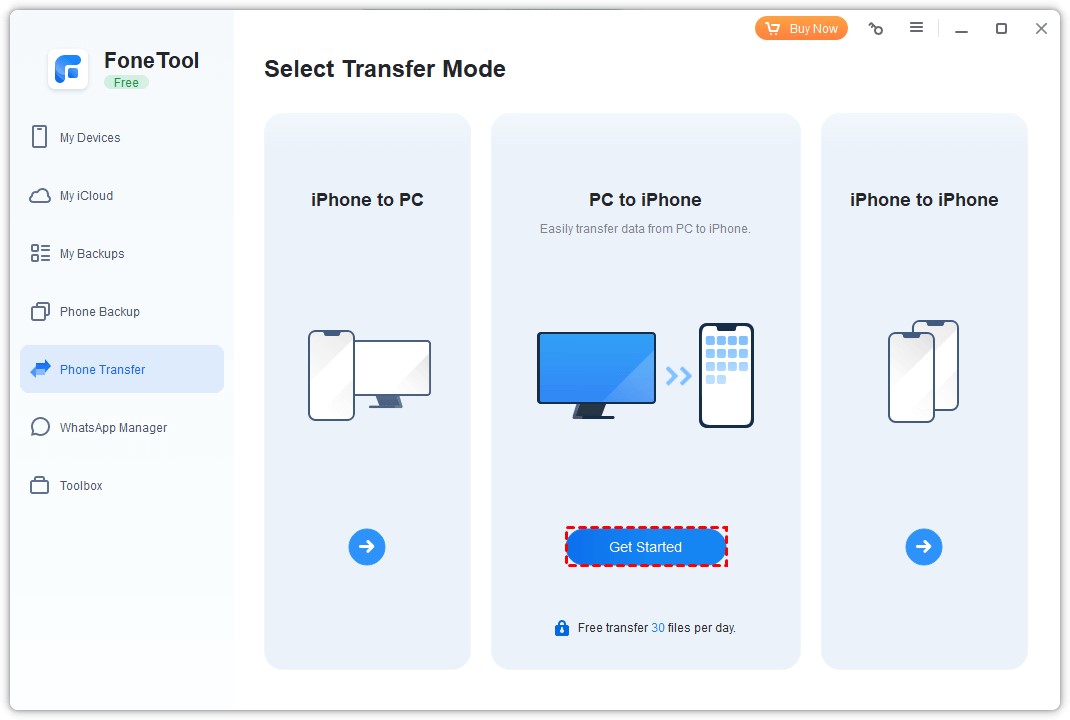
Krok 2 . Spustite FoneTool > Prejdite na Phone Transfer > Vyberte PC do iPhone a pokračujte kliknutím na Začať.
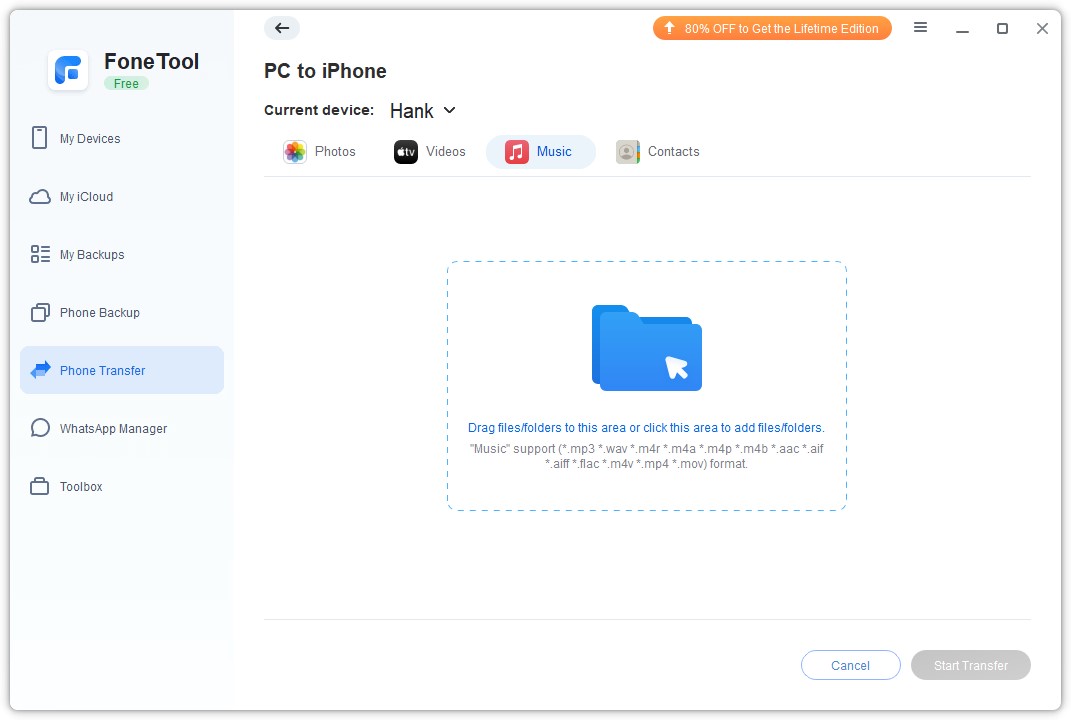
Krok 3. Priamo presuňte svoje obľúbené súbory do poľa.
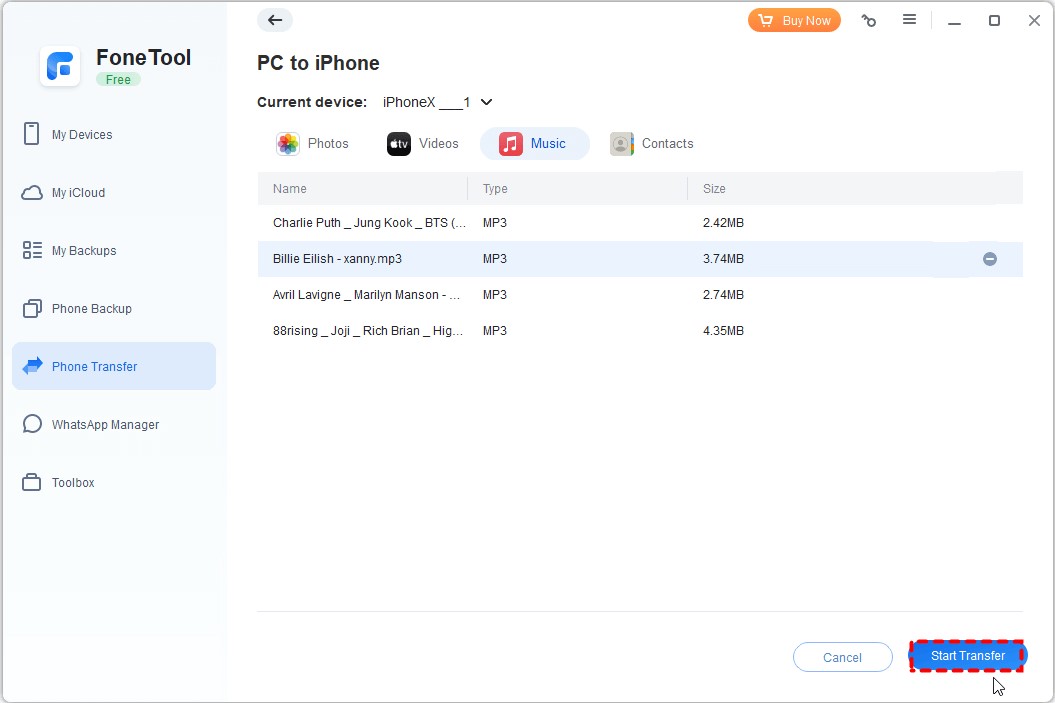
Krok 4. Potvrďte údaje, ktoré chcete presunúť > Začnite kliknutím na tlačidlo Spustiť prenos.
Z podrobných krokov teraz viete, ako efektívne dokončiť prenos MP3 medzi počítačom a iPhone. Ak potrebujete preniesť súbory z iPhone do PC, proces môžete dokončiť aj výberom možnosti iPhone do PC v rozhraní Phone Transfer.
Záver
Teraz môžete vidieť, prečo je FoneTool najlepší softvér na prenos dát pre iPhone. Pomocou niekoľkých jednoduchých krokov môžete preniesť dáta z počítača do iPhone. Okrem hudby môžete prenášať aj fotografie, videá, kontakty a ďalšie.
V prípade potreby môžete použiť funkciu Zálohovanie telefónu na jednoduché zálohovanie niektorých alebo všetkých údajov telefónu. FoneTool, ktorý vyvinul skúsený tím, ktorý sa venuje bezpečnosti údajov, dôveruje viac ako 3 miliónom používateľov na celom svete a určite si získa aj váš súhlas! Skúste to hneď teraz!

What Happens to Your Business Number When a Work Phone Is Lost, Stolen or Replaced?
What happens to your business number depends on where it lives. If the number is tied to the SIM in the lost phone, it stops working for you until the carrier issues a replacement SIM or eSIM, and calls from customers go nowhere in the meantime.
If the number lives in a cloud phone account instead, losing the phone doesn't take the number with it. Calls can ring the rest of the team straight away, and the employee signs into the calling app on a new phone to pick up where they left off, with their call history and voicemails still in the account.

Cricfy APK Download Latest Version For Android
Cricfy is a sports streaming application designed for users interested in watching live sports and following different sporting events. Its main focus is to provide convenient access to sports-related content through a mobile-friendly platform.
Cricket is an important part of its appeal, particularly for viewers who enjoy international matches, domestic competitions, and major cricket tournaments. Depending on the available content and supported sources, users may also find football and other sports-related options.
The application is particularly interesting for people who prefer watching sports on their Android devices rather than sitting in front of a television.

Uniwin-Global Rockchip Embedded Motherboards: Sourcing from China for MOQ, QC, Export and Technical Support
Sourcing Rockchip motherboards from China is a procurement question, not a price search. The seven things that actually decide whether a supplier works: pricing that scales with order size, a quality floor you can verify, export terms you can clear, a sample path that starts below the MOQ, technical support that answers, and engineering that catches integration issues before they cost you a quarter.
Uniwin-Global is the running example. The company has built Rockchip boards since 2016 [3], the current flagship is the RK3588 M588 with a 6 TOPS NPU [1], and the site lists 20+ countries served and 200+ projects delivered [4]. The published quality baseline is a sub-1% defect rate with a 1-year motherboard warranty, and the service baseline is a 2-hour response and 48-hour resolution [5, 6].
Two other supplier lanes exist: multi-platform makers that quote Rockchip alongside Allwinner and others, and dev-kit sellers that sell a reference board at a low price. Each lane fits a different stage of the project. The wrong lane is more expensive than the right one at the same unit price. Pick the lane first. The price follows.
One caution. A product page is a claim. The MOQ, the trade term, the QC gate and the SLA all need to be in writing before the PO is signed.

How to Build a HIFU Product Line That Distributors Can Manage
Every HIFU variant a distributor adds brings its own cartridge bin, manual, training file, and spare-parts list. Product lines rarely get out of hand through planning. They grow one request at a time: a different housing color, a narrower cartridge, a regional plug for one important clinic. Eventually pricing can't be explained in one sentence, and cartridge orders split across codes that look almost identical.
This guide is for distributors, importers, and private-label buyers who stock HIFU systems for clinics and med spas and carry the after-sales work themselves. It covers how to group clinic demand, which differences deserve their own model code, how to price tiers against landed cost, and how to plan cartridge replenishment and service records around machines already in the field. The aim is a line chosen by what you can stock, train, and service, rather than by what clinics happen to ask for.

Check SIM Owner Details in Pakistan Official Guide
Phones have become an integral part of human life. From making calls to mobile banking and shopping and social media every function requires a sim card to get connected in Pakistan. A responsible person must know how many sim cards are registered under his CNIC and if they are verified or not. The Check SIM Owner Details Pakistan system enables you to ensure that your SIM cards are legitimate and registered under your details.
While searching for Fresh SIM Database, it is critical to understand that SIM card details are private and confidential, and only the owner can check them. This article will explain what SIM owner details are, why it is essential to verify them, how to check them officially, and why it is safer to avoid unverified sources for checking.

Pak SIM Owner Details and SIM Ownership Complete Guide
It becomes difficult to understand and navigate SIM card registration and ownership in Pakistan considering all the regulations and the amount of information that is available online. You may have gotten a new SIM card, or you might be curious about how many SIM cards are associated with your CNIC number; in any case, having an understanding of the process is critical.

How to Check SIM Owner Details and Registration Status in Pakistan
Checking your SIM card details is very important in Pakistan today. Every mobile SIM card is directly linked to your CNIC number through thumb verification. Keeping an eye on your Pak Sim Owner Details protects your identity, stops scams, and makes sure nobody uses your name for wrong activities. Many people search for ways to check their Sim Owner Details 2026 status, see active numbers, and remove unused SIMs. This article explains how you can easily check everything yourself without any trouble.

Apple iPhone Duo Review: Foldable iPhone Specs, Price & Features
Apple is entering the foldable smartphone market with the iPhone Duo, a premium foldable iPhone built around two displays, the A20 Pro processor, a titanium construction, dual 48 MP cameras and a redesigned iOS experience focused on multitasking. But the iPhone Duo is interesting for another reason as well. A folding phone is inherently more complex than a conventional smartphone. It has two displays, a precision hinge, multiple operating positions and completely new ways of using cameras and applications.
 SKONTROLUJTE IMEI


















