В настоящее время получение спам-сообщений стало обычным явлением при использовании социальных сетей, включая Instagram. Несмотря на то, что вы можете изменить свой профиль с общедоступного на частный, незнакомые люди все равно могут отправлять вам запросы сообщений или добавлять вас в случайные группы, а некоторые даже неуместны. Итак, как перестать добавляться в группы в Instagram? К счастью, мы знаем, как с этим справиться, и покажем вам, как это сделать за считанные минуты.

Волна спама случается практически везде, где мы пользуемся социальными сетями. Легкий доступ в Интернет и отсутствие контроля заставляют многих людей чувствовать себя безнаказанными. Постоянное навязчивое поведение и нежелательные запросы на вступление в группы стали обычным явлением. Как справиться с этой проблемой? Можно ли полностью отключить присоединение к группам Instagram? В этом руководстве мы максимально подробно расскажем, как это сделать.
По теме: Как узнать, кто отписался от вас в Instagram?
1. Можно ли запретить кому-то добавлять вас в группы Instagram?
Что ж, технически говоря, нет никакого способа помешать другим добавлять вас в группы в Instagram. Это относится как к людям, на которых вы подписаны, так и к тем, на кого вы не подписаны. Пока группа людей, которых вы знаете, видны на экране прямых сообщений Instagram, запросы группы неизвестных лиц будут отправляться в специальную папку Requests.
Ваши «особые запросы», если они у вас есть, появятся на экране личных сообщений в виде ссылки «Запросы» в правом верхнем углу.
2. Как игнорировать уведомления о добавлении в группу Instagram?
1. Сначала откройте приложение Instagram на своем телефоне.
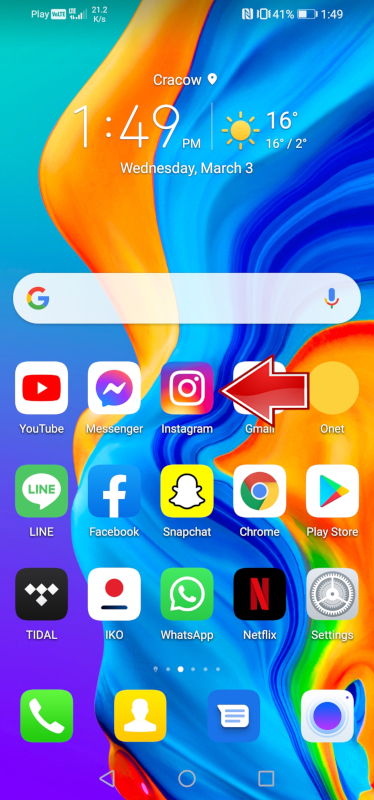
2. Теперь, после входа в свой профиль, в правом верхнем углу вы найдете три полоски , нажмите на них.
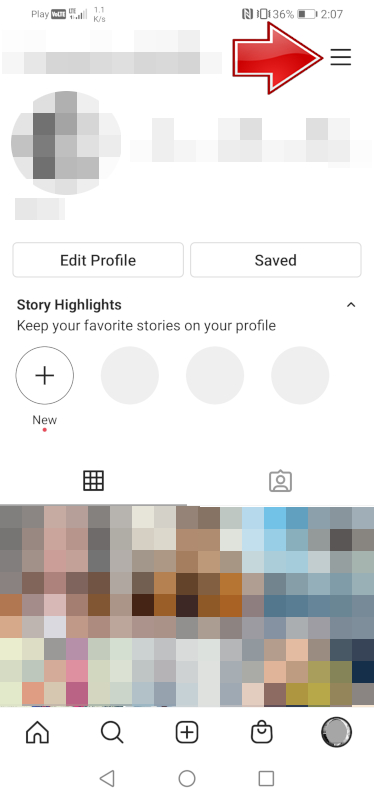
3. Теперь в самом низу экрана вы найдете параметр «Настройки» , введите его.
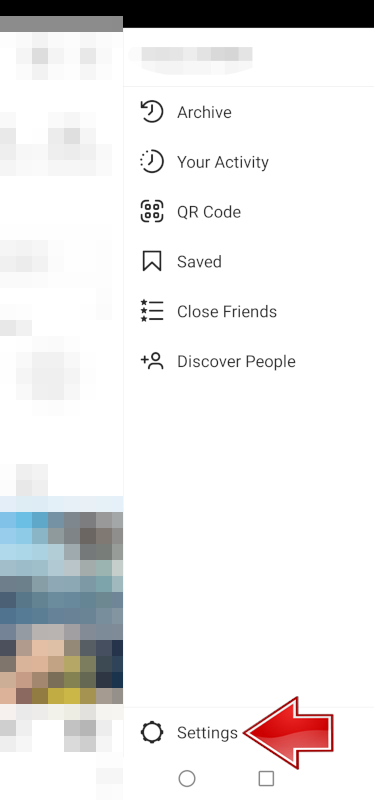
4. Выберите Уведомления из доступного списка.

5. Теперь перейдите в личные сообщения.
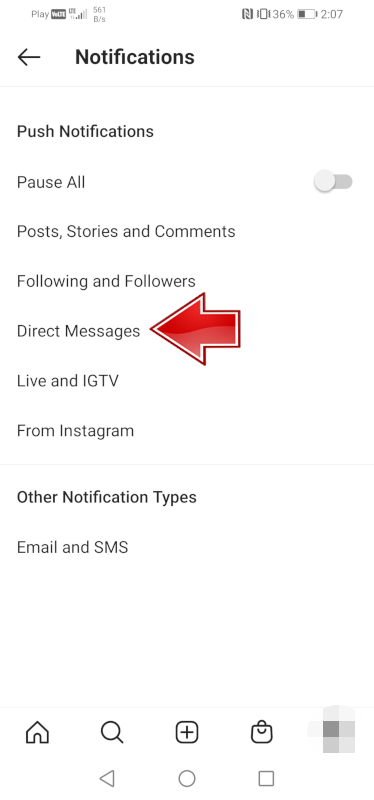
6. Напоследок осталось отключить запросы из групп.
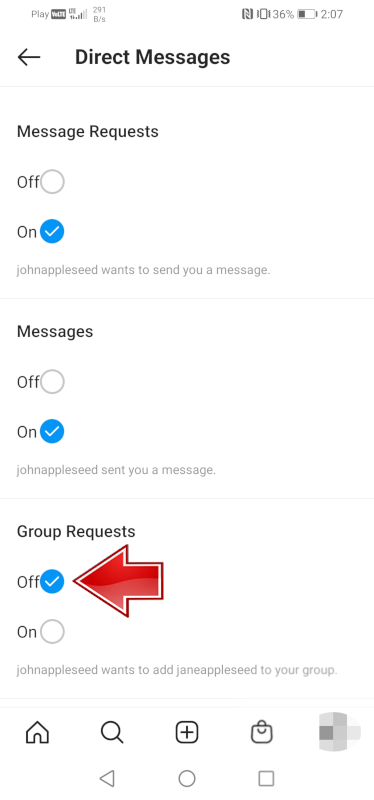
В то время как другие по-прежнему смогут попросить вас добавить вас в группу, вы больше не будете получать уведомления об этих событиях.
Другие способы уменьшить количество уведомлений
Помимо упомянутого выше метода, у вас все еще есть возможность отключить оповещения для групповых запросов, вы можете попробовать следующие варианты, чтобы игнорировать уведомления или избегать групповых сообщений в Instagram.
1. Отключить группу
Если группа, к которой вы принадлежите, является одним из людей, на которых вы подписаны, или включает в себя друзей и родственников, вы можете отключить уведомления, чтобы предотвратить цепочку. Для этого выполните следующие действия:
1. Сначала откройте приложение Instagram на своем телефоне.
2. Теперь откройте папку с сообщениями.

3. Теперь выберите группу, к которой вы принадлежите.
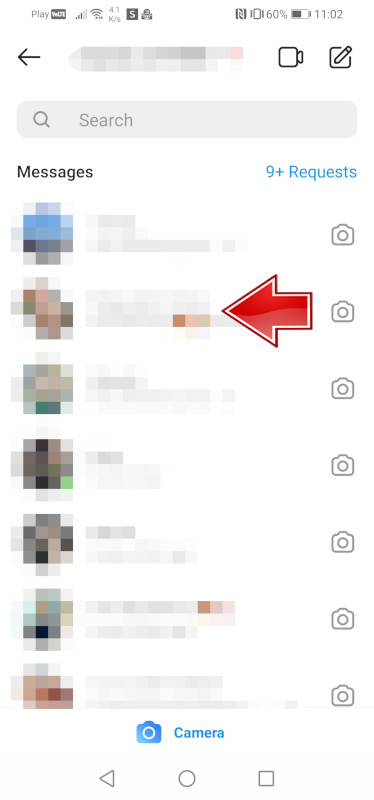
4. В правом верхнем углу щелкните значок информации.

5. На этом этапе вы можете отключить сообщения , перемещая ползунок.
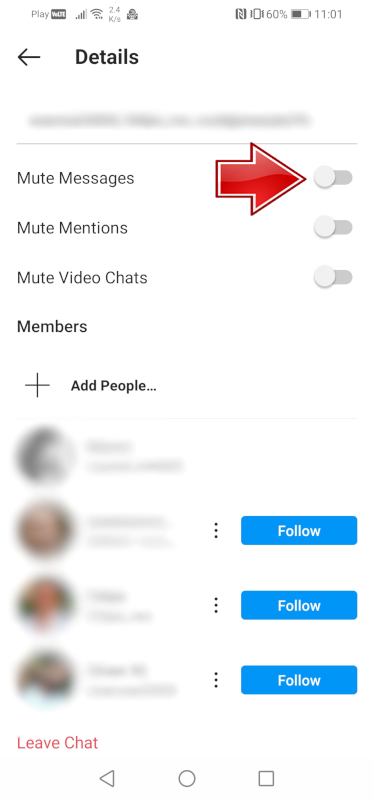
Кроме того, вы также можете отключить звук записей и видеозвонков на том же экране, если хотите.
2. Выход из чата
Если вы присоединились к группе, состоящей из нескольких человек, которых вы не знаете лично, вы можете выйти из чата напрямую, следуя этим инструкциям:
1. Сначала откройте приложение Instagram на своем телефоне.
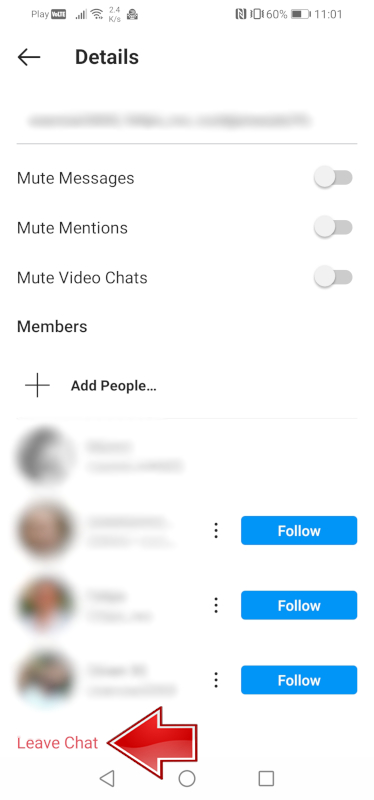
Теперь, как и раньше, заходим в приложение Instagram> Сообщения> Выбираем группу> Значок информации> В самом низу выбираем опцию Выйти из чата .
3. Сообщите, что пользователь добавляет вас в группу.
Однако, когда неизвестный человек добавляет вас в группу Instagram, вы можете сообщить об этом как о злоупотреблении, спаме или по любой другой причине, и Instagram примет меры в отношении профиля пользователя.
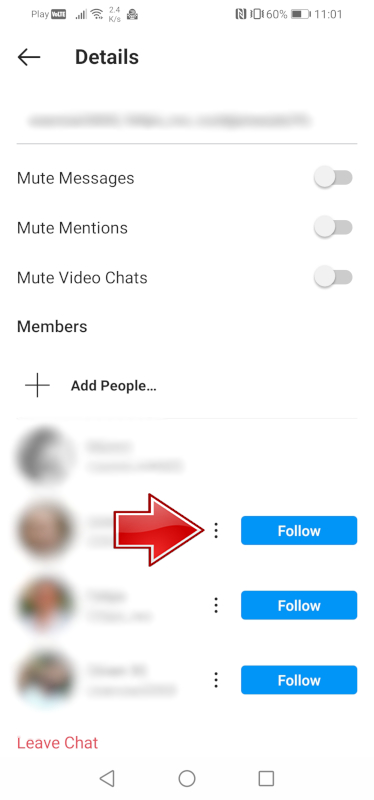
1. Теперь мы делаем те же шаги, что и в предыдущих пунктах, поэтому открываем приложение Instagram> Сообщения> Выберите группу> Значок информации> Теперь в списке участников есть значки с тремя точками. Щелкните по ним.
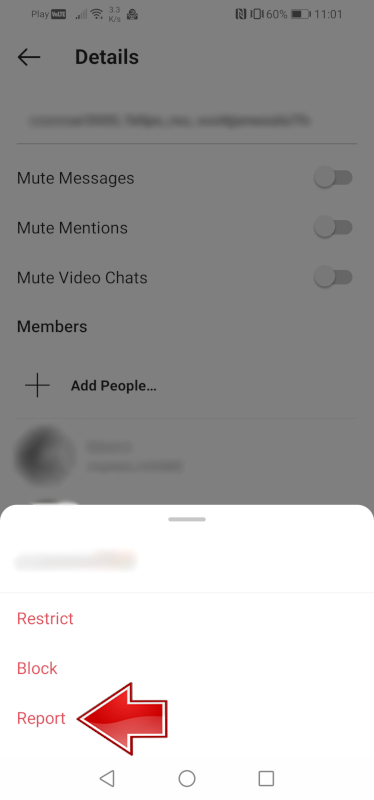
2. Теперь нажмите « Отчет», и все.
4. Заблокируйте человека, который добавляет вас несколько раз.
В случае нескольких добавлений в группы одним и тем же пользователем, единственный вариант - заблокировать их раз и навсегда.
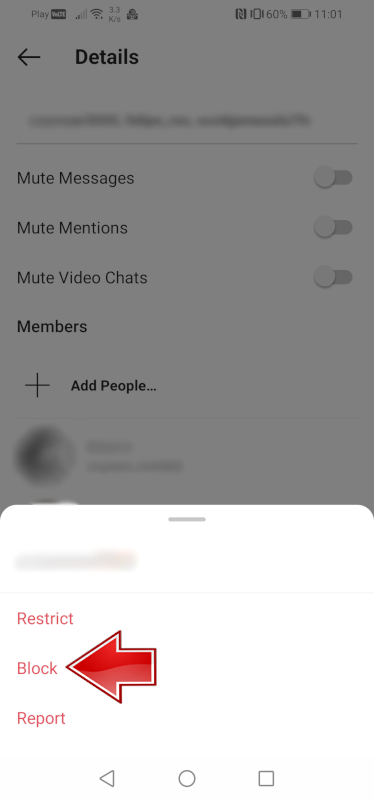
1. 1. Снова нам нужно сделать те же шаги, что и в предыдущих пунктах, поэтому мы открываем приложение Instagram> Сообщения> Выберите группу> Значок информации> Теперь в списке участников есть значки с тремя точками. Нажмите на них, на этот раз из доступного списка выберите вариант Блокировать.
Сообщите мне, был ли вам полезен какой-либо из описанных методов.
Вы можете узнать больше об Instagram: ЗДЕСЬ.
Подписывайтесь на нас





What Happens to Your Business Number When a Work Phone Is Lost, Stolen or Replaced?
What happens to your business number depends on where it lives. If the number is tied to the SIM in the lost phone, it stops working for you until the carrier issues a replacement SIM or eSIM, and calls from customers go nowhere in the meantime.
If the number lives in a cloud phone account instead, losing the phone doesn't take the number with it. Calls can ring the rest of the team straight away, and the employee signs into the calling app on a new phone to pick up where they left off, with their call history and voicemails still in the account.

Cricfy APK Download Latest Version For Android
Cricfy is a sports streaming application designed for users interested in watching live sports and following different sporting events. Its main focus is to provide convenient access to sports-related content through a mobile-friendly platform.
Cricket is an important part of its appeal, particularly for viewers who enjoy international matches, domestic competitions, and major cricket tournaments. Depending on the available content and supported sources, users may also find football and other sports-related options.
The application is particularly interesting for people who prefer watching sports on their Android devices rather than sitting in front of a television.

Uniwin-Global Rockchip Embedded Motherboards: Sourcing from China for MOQ, QC, Export and Technical Support
Sourcing Rockchip motherboards from China is a procurement question, not a price search. The seven things that actually decide whether a supplier works: pricing that scales with order size, a quality floor you can verify, export terms you can clear, a sample path that starts below the MOQ, technical support that answers, and engineering that catches integration issues before they cost you a quarter.
Uniwin-Global is the running example. The company has built Rockchip boards since 2016 [3], the current flagship is the RK3588 M588 with a 6 TOPS NPU [1], and the site lists 20+ countries served and 200+ projects delivered [4]. The published quality baseline is a sub-1% defect rate with a 1-year motherboard warranty, and the service baseline is a 2-hour response and 48-hour resolution [5, 6].
Two other supplier lanes exist: multi-platform makers that quote Rockchip alongside Allwinner and others, and dev-kit sellers that sell a reference board at a low price. Each lane fits a different stage of the project. The wrong lane is more expensive than the right one at the same unit price. Pick the lane first. The price follows.
One caution. A product page is a claim. The MOQ, the trade term, the QC gate and the SLA all need to be in writing before the PO is signed.

How to Build a HIFU Product Line That Distributors Can Manage
Every HIFU variant a distributor adds brings its own cartridge bin, manual, training file, and spare-parts list. Product lines rarely get out of hand through planning. They grow one request at a time: a different housing color, a narrower cartridge, a regional plug for one important clinic. Eventually pricing can't be explained in one sentence, and cartridge orders split across codes that look almost identical.
This guide is for distributors, importers, and private-label buyers who stock HIFU systems for clinics and med spas and carry the after-sales work themselves. It covers how to group clinic demand, which differences deserve their own model code, how to price tiers against landed cost, and how to plan cartridge replenishment and service records around machines already in the field. The aim is a line chosen by what you can stock, train, and service, rather than by what clinics happen to ask for.

Check SIM Owner Details in Pakistan Official Guide
Phones have become an integral part of human life. From making calls to mobile banking and shopping and social media every function requires a sim card to get connected in Pakistan. A responsible person must know how many sim cards are registered under his CNIC and if they are verified or not. The Check SIM Owner Details Pakistan system enables you to ensure that your SIM cards are legitimate and registered under your details.
While searching for Fresh SIM Database, it is critical to understand that SIM card details are private and confidential, and only the owner can check them. This article will explain what SIM owner details are, why it is essential to verify them, how to check them officially, and why it is safer to avoid unverified sources for checking.

Pak SIM Owner Details and SIM Ownership Complete Guide
It becomes difficult to understand and navigate SIM card registration and ownership in Pakistan considering all the regulations and the amount of information that is available online. You may have gotten a new SIM card, or you might be curious about how many SIM cards are associated with your CNIC number; in any case, having an understanding of the process is critical.

How to Check SIM Owner Details and Registration Status in Pakistan
Checking your SIM card details is very important in Pakistan today. Every mobile SIM card is directly linked to your CNIC number through thumb verification. Keeping an eye on your Pak Sim Owner Details protects your identity, stops scams, and makes sure nobody uses your name for wrong activities. Many people search for ways to check their Sim Owner Details 2026 status, see active numbers, and remove unused SIMs. This article explains how you can easily check everything yourself without any trouble.

Apple iPhone Duo Review: Foldable iPhone Specs, Price & Features
Apple is entering the foldable smartphone market with the iPhone Duo, a premium foldable iPhone built around two displays, the A20 Pro processor, a titanium construction, dual 48 MP cameras and a redesigned iOS experience focused on multitasking. But the iPhone Duo is interesting for another reason as well. A folding phone is inherently more complex than a conventional smartphone. It has two displays, a precision hinge, multiple operating positions and completely new ways of using cameras and applications.
 ПРОВЕРИТЬ IMEI


















