Para os fãs de música, os arquivos MP3 não são desconhecidos. Editar arquivos MP3 em seu computador ou depois de baixar suas músicas favoritas para obter os resultados desejados pode ser difícil de transferir os dados do PC para o iPhone.
Devido a problemas de compatibilidade entre dispositivos Windows e iOS, mover arquivos entre essas duas plataformas não é como transferir arquivos de Mac para iPhone. Os usuários geralmente usam o iTunes para sincronizar arquivos.
Por que você precisa transferir mp3 para o iPhone sem o iTunes?
No entanto, como software oficial da Apple, o iTunes continuará funcionando no Windows e haverá problemas e erros imprevistos que podem interromper o processo de transferência. Para a maioria dos usuários, o design do iTunes é intuitivo e sua interface é bastante móvel, tornando o processo de transferência mais comum.
Além disso, o iTunes suporta apenas a transferência unilateral de arquivos, e a transferência de arquivos do iPhone para o PC é muito variada. Portanto, é importante encontrar uma maneira de transferir arquivos MP3 do PC para o iPhone sem usar o iTunes.
O melhor software para transferir MP3 do PC para o iPhone sem iTunes
Se você precisar transferir arquivos MP3 do seu PC para o seu iPhone, o software profissional de transferência de dados do iPhone - FoneTool será seu melhor assistente.
Velocidade de transferência super rápida: O FoneTool valoriza taxas de transferência mais altas do que outros softwares do setor. Transfira milhares de arquivos de música para o iPhone em minutos.
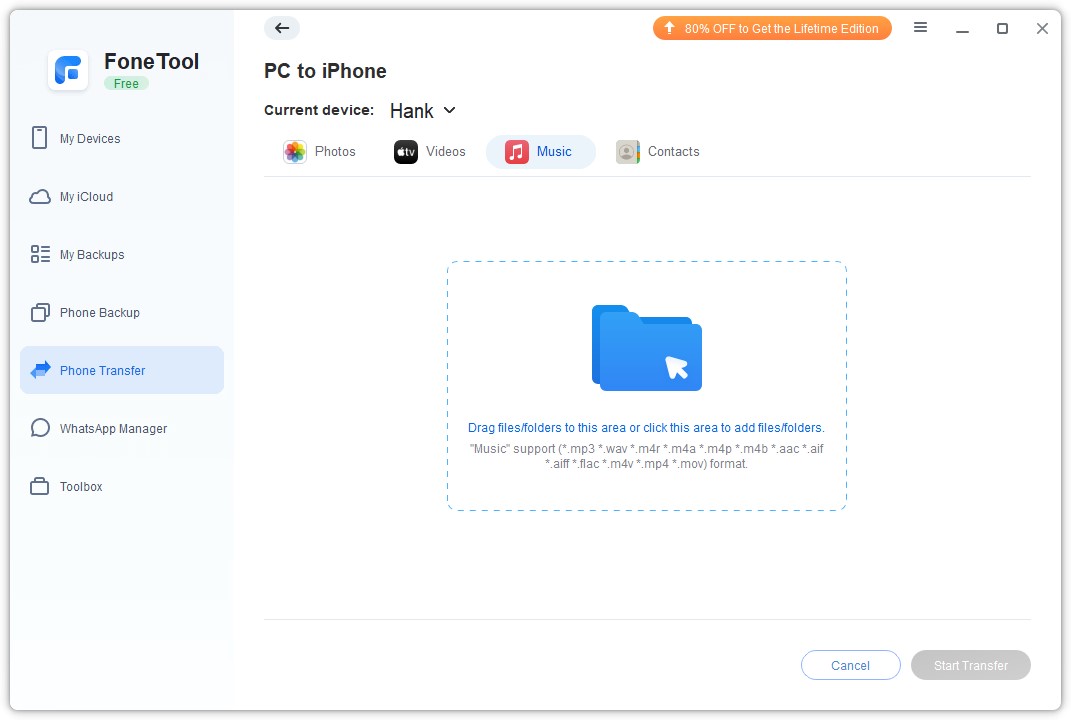
Mostrar diferentes tipos de arquivos de música : O FoneTool possui um poderoso reconhecimento de arquivos que pode identificar facilmente os formatos de música comuns usados na vida cotidiana, na pesquisa e no trabalho, como mp3, m4a, m4b, m4p, M4r, aif, aiff, flac, wav , aac, que ajuda os usuários a encontrar os arquivos de que precisam.
Conexão USB segura: FoneTool usa apenas cabo USB para transmissão e garante nenhum vazamento de dados. Você pode transferir os dados para uma glória completa. Diferentemente do iTunes, com diferenças ou erros comuns durante o uso, o FoneTool funciona em diferentes sistemas Windows, e não interage muito. Ele fornece transferência eficiente e economiza muito tempo para os usuários.
Transferir mais de um tipo de dados: Através da música, você pode transmitir fotos, vídeos e contatos do iPhone, do PC do iphone ou do iPhone para o iPhone.
Ótima compatibilidade : FoneTool suporta uma variedade de dispositivos e sistemas iOS, incluindo os mais recentes, para fornecer compatibilidade de som.
Recursos poderosos: Além de transferir dados para o iPhone, o FoneTool permite fazer backup dos dados do iPhone, fornecer backups de dados do WhatsApp, gerenciar dados no iCloud e digitalizar e mover cópias de fotos para o iPhone ou computador.
Depois de estudar sobre os muitos recursos e benefícios do FoneTool como transferir MP3 para iPhone sem iTunes, você pode começar a ler agora para aprender como usar o FoneTool para transferir MP3 para iPhone sem iTunes . Este processo simples e eficiente garante que você fique muito satisfeito ao usar o FoneTool para suas necessidades de transferência.
Passo 1. Baixe o FoneTool no seu PC com Windows > Conecte o iPhone ao computador através de um cabo USB confiável > Quando eu voltar ao UP, começarei a construir um novo eu.
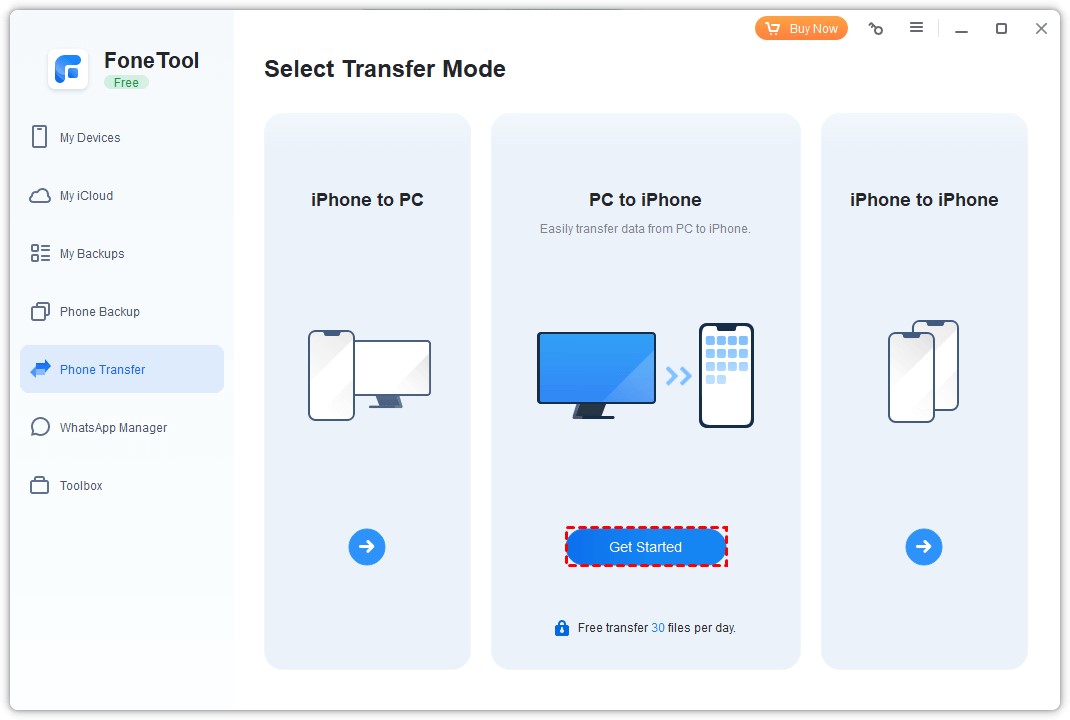
Passo 2 . Inicie o FoneTool > Vá para Transferência de telefone > Escolha PC para iPhone e clique em Começar para continuar.
Etapa 3. Arraste e solte diretamente seus arquivos favoritos na caixa.
Passo 4. Confirme os dados que deseja mover> Clique no botão Iniciar transferência para começar.
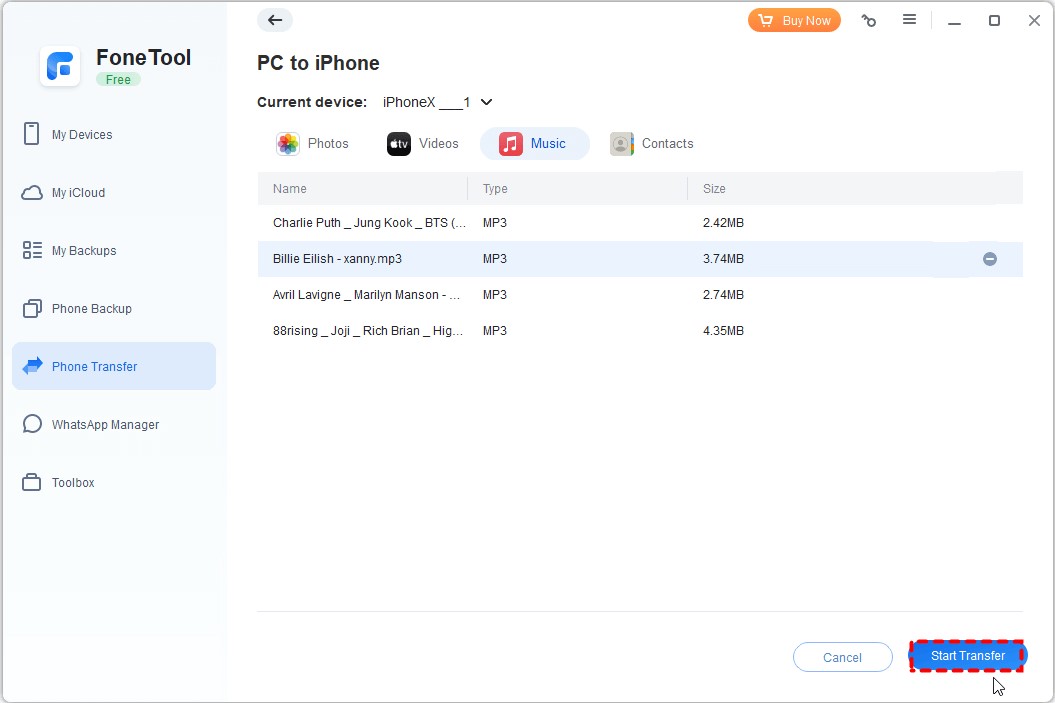
A partir das etapas detalhadas, agora você pode saber como finalizar com eficiência a transferência de MP3 entre o seu PC e o iPhone. Se precisar transferir arquivos do iPhone para o PC, você também pode escolher a opção iPhone para PC na interface de transferência de telefone para finalizar o processo.
Conclusão
Agora você pode ver porque o FoneTool é o melhor software de transferência de dados do iPhone. Com apenas alguns passos simples, você pode transferir dados do seu PC para o seu iPhone. Além de músicas, você também pode transferir fotos, vídeos, contatos e muito mais.
Se necessário, você pode usar o recurso Backup do telefone para fazer backup facilmente de alguns ou de todos os dados do telefone. Desenvolvido por uma equipe experiente dedicada à segurança de dados, o FoneTool conta com a confiança de mais de 3 milhões de usuários em todo o mundo e com certeza também ganhará sua aprovação! Experimente agora mesmo!

What Happens to Your Business Number When a Work Phone Is Lost, Stolen or Replaced?
What happens to your business number depends on where it lives. If the number is tied to the SIM in the lost phone, it stops working for you until the carrier issues a replacement SIM or eSIM, and calls from customers go nowhere in the meantime.
If the number lives in a cloud phone account instead, losing the phone doesn't take the number with it. Calls can ring the rest of the team straight away, and the employee signs into the calling app on a new phone to pick up where they left off, with their call history and voicemails still in the account.

Cricfy APK Download Latest Version For Android
Cricfy is a sports streaming application designed for users interested in watching live sports and following different sporting events. Its main focus is to provide convenient access to sports-related content through a mobile-friendly platform.
Cricket is an important part of its appeal, particularly for viewers who enjoy international matches, domestic competitions, and major cricket tournaments. Depending on the available content and supported sources, users may also find football and other sports-related options.
The application is particularly interesting for people who prefer watching sports on their Android devices rather than sitting in front of a television.

Uniwin-Global Rockchip Embedded Motherboards: Sourcing from China for MOQ, QC, Export and Technical Support
Sourcing Rockchip motherboards from China is a procurement question, not a price search. The seven things that actually decide whether a supplier works: pricing that scales with order size, a quality floor you can verify, export terms you can clear, a sample path that starts below the MOQ, technical support that answers, and engineering that catches integration issues before they cost you a quarter.
Uniwin-Global is the running example. The company has built Rockchip boards since 2016 [3], the current flagship is the RK3588 M588 with a 6 TOPS NPU [1], and the site lists 20+ countries served and 200+ projects delivered [4]. The published quality baseline is a sub-1% defect rate with a 1-year motherboard warranty, and the service baseline is a 2-hour response and 48-hour resolution [5, 6].
Two other supplier lanes exist: multi-platform makers that quote Rockchip alongside Allwinner and others, and dev-kit sellers that sell a reference board at a low price. Each lane fits a different stage of the project. The wrong lane is more expensive than the right one at the same unit price. Pick the lane first. The price follows.
One caution. A product page is a claim. The MOQ, the trade term, the QC gate and the SLA all need to be in writing before the PO is signed.

How to Build a HIFU Product Line That Distributors Can Manage
Every HIFU variant a distributor adds brings its own cartridge bin, manual, training file, and spare-parts list. Product lines rarely get out of hand through planning. They grow one request at a time: a different housing color, a narrower cartridge, a regional plug for one important clinic. Eventually pricing can't be explained in one sentence, and cartridge orders split across codes that look almost identical.
This guide is for distributors, importers, and private-label buyers who stock HIFU systems for clinics and med spas and carry the after-sales work themselves. It covers how to group clinic demand, which differences deserve their own model code, how to price tiers against landed cost, and how to plan cartridge replenishment and service records around machines already in the field. The aim is a line chosen by what you can stock, train, and service, rather than by what clinics happen to ask for.

Check SIM Owner Details in Pakistan Official Guide
Phones have become an integral part of human life. From making calls to mobile banking and shopping and social media every function requires a sim card to get connected in Pakistan. A responsible person must know how many sim cards are registered under his CNIC and if they are verified or not. The Check SIM Owner Details Pakistan system enables you to ensure that your SIM cards are legitimate and registered under your details.
While searching for Fresh SIM Database, it is critical to understand that SIM card details are private and confidential, and only the owner can check them. This article will explain what SIM owner details are, why it is essential to verify them, how to check them officially, and why it is safer to avoid unverified sources for checking.

Pak SIM Owner Details and SIM Ownership Complete Guide
It becomes difficult to understand and navigate SIM card registration and ownership in Pakistan considering all the regulations and the amount of information that is available online. You may have gotten a new SIM card, or you might be curious about how many SIM cards are associated with your CNIC number; in any case, having an understanding of the process is critical.

How to Check SIM Owner Details and Registration Status in Pakistan
Checking your SIM card details is very important in Pakistan today. Every mobile SIM card is directly linked to your CNIC number through thumb verification. Keeping an eye on your Pak Sim Owner Details protects your identity, stops scams, and makes sure nobody uses your name for wrong activities. Many people search for ways to check their Sim Owner Details 2026 status, see active numbers, and remove unused SIMs. This article explains how you can easily check everything yourself without any trouble.

Apple iPhone Duo Review: Foldable iPhone Specs, Price & Features
Apple is entering the foldable smartphone market with the iPhone Duo, a premium foldable iPhone built around two displays, the A20 Pro processor, a titanium construction, dual 48 MP cameras and a redesigned iOS experience focused on multitasking. But the iPhone Duo is interesting for another reason as well. A folding phone is inherently more complex than a conventional smartphone. It has two displays, a precision hinge, multiple operating positions and completely new ways of using cameras and applications.
 VERIFICAR IMEI


















