信頼性の高いパーティション ソフトウェアをお探しの場合は、AOMEI Partition Assistant が最適です。Windows 11、10、8、7 でディスク パーティションを効果的に管理するために実行できます。
ディスクパーティションソフトウェアの概要
物理ディスク ドライブをパーティションと呼ばれる個別の論理セクションに分割するのは難しい場合があります。ただし、信頼性の高いパーティション ソフトウェアを使用すると、このプロセスが簡単かつ安全になります。このソフトウェアを使用すると、ユーザーはディスク領域を効果的に管理し、データを整理できます。
このようなソフトウェアはパーティションの作成と管理に役立つだけでなく、便利な Windows ユーティリティでもあります。パーティションの削除、スペースの割り当て、データ ストレージの有効活用など、さまざまな操作を実行できます。
さらに、ディスク パーティション ソフトウェアを探す理由は他にもいくつかあります。
ドライブパーティションソフトウェアを求める人はさまざまな理由から:
- パフォーマンスの向上: ドライブをジョブごとに別々のセクションに分割することで、ドライブを高速化できます。個人ファイルを D ドライブに置き、オペレーティング システムを C ドライブに置くことは、システムの動作を向上させる 1 つの方法です。
- データ管理: パーティション ソフトウェアを使用すると、パーティションを結合したり、パーティションのサイズを変更したりできるため、データの管理が容易になります。これらの機能は、より多くの情報を保存する必要がある場合に便利です。
- オペレーティング システムのセットアップ: 同じハード ドライブに複数のオペレーティング システムをセットアップするには、ハード ドライブをパーティション分割する必要があります。パーティション ソフトウェアを使用すると、新しいパーティションをすばやく作成して、Windows 11 などの別の OS をインストールできます。
信頼性の高いパーティションソフトウェアをダウンロード: AOMEI Partition Assistant
Windows システムにはディスク管理や DiskPart などのパーティション マネージャーが組み込まれていますが、要件が厳しく、エラーが表示されることが多いため、多くのユーザーはそれらを好みません。そのため、Windows 用の信頼性の高いパーティション ソフトウェアが最適な選択です。
多くのツールの中で、 AOMEI Partition Assistant は理想的な選択肢として際立っています。Windows 11、10、8、7 のすべてのバージョンで動作し、次のような利点があります。
- AOMEI Partition Assistant は、パーティションの作成、拡張、縮小、削除、フォーマットなど、ディスク管理で実行できる一般的なタスクを実行できます。しかし、それだけではありません。ユーザーは、ハード ドライブの移動、削除、パーティション分割、パーティションの結合、および他のドライブへのパーティションのクローン作成を行うことができます。
- AOMEI Partition Assistant は、PC クリーナー、大きなファイルの削除、ハードドライブ間でのインストール済みプログラムの移動など、Windows コンピューターのパフォーマンスを最適化することもできます。
- 最も重要なのは、複雑なタスクを実行するときにデータの安全性が確保され、ファイルとフォルダーが保持されることです。実際にデータが失われた場合、このドライブ パーティション ソフトウェアはハード ディスクのデータ復旧ツールとしても機能します。
AOMEI Partition Assistant はシンプルなインターフェースを備えているため、さまざまな経験レベルのユーザーに適しています。したがって、Windows PC ディスク パーティションを効率的に管理するための最適なオプションです。
注意する必要がある唯一のことは、すべての高度な機能のロックを解除するには、上位エディションに移行する必要があるかもしれないということです。
信頼性の高いパーティション ソフトウェア AOMEI Partition Assistant がどのように機能するかを確認するために、例として C ドライブを拡張してみます。まず、ソフトウェアをダウンロードし、次に以下に示す手順に従います。
ステップ 1. Windows 10 または 11 に AOMEI パーティション ソフトウェアをインストールして起動します。メイン インターフェイスで、C ドライブに空き領域を割り当てるドライブ (例: D) を右クリックし、「パーティションのサイズ変更/移動」を選択します。

ステップ 2. 「パーティションの移動とサイズ変更」ウィンドウでは、パーティション サイズを自由に調整できます。次に「OK」をクリックします。ステップ 2. 「パーティションの移動とサイズ変更」ウィンドウでは、パーティション サイズを自由に調整できます。次に「 OK 」をクリックします。

ステップ 3.未割り当て領域が生成されたら、C ドライブを右クリックし、「パーティションのサイズ変更」を選択します。
ステップ 4.ポップアップ ウィンドウで、C ドライブを右側にドラッグし、未割り当て領域を使用して拡張します。

ステップ 5 . その後、メイン インターフェイスが表示されます。ここで、「適用」をクリックしてプロセスを続行できます。

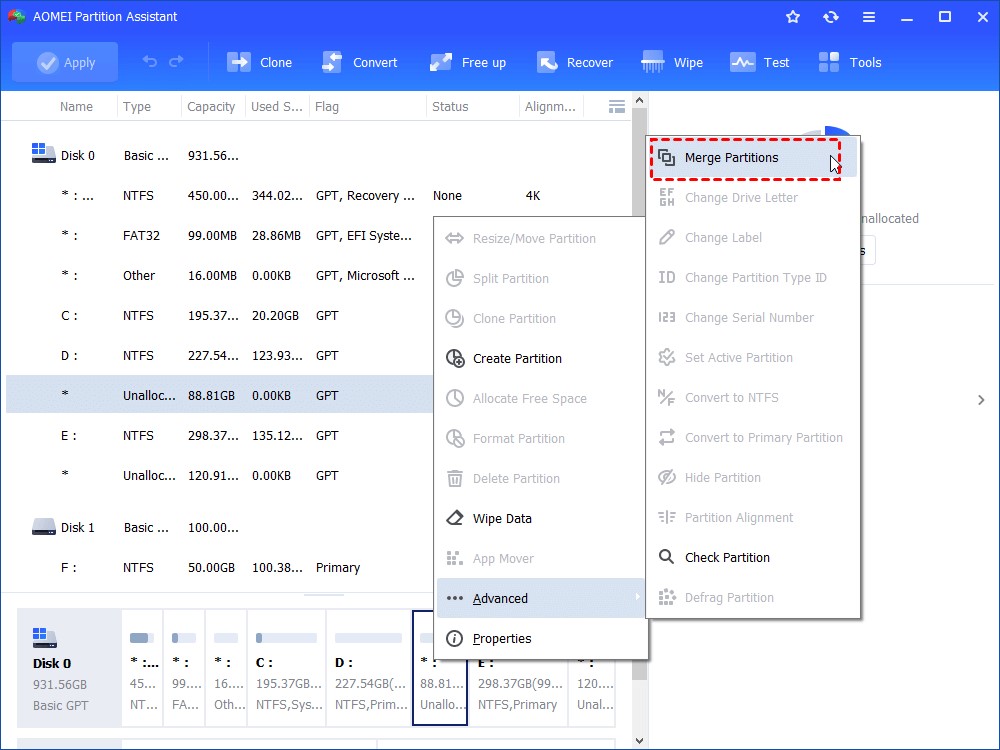
C ドライブを拡張するには、「パーティションの結合」機能を使用して、別のパーティションまたは未割り当て領域を結合することもできます。
ステップ 1.拡張する必要があるパーティションを右クリックし、「詳細」>「パーティションの結合」を選択します。
ステップ 2.パーティションと未割り当て領域を選択し、「 OK 」をクリックします。
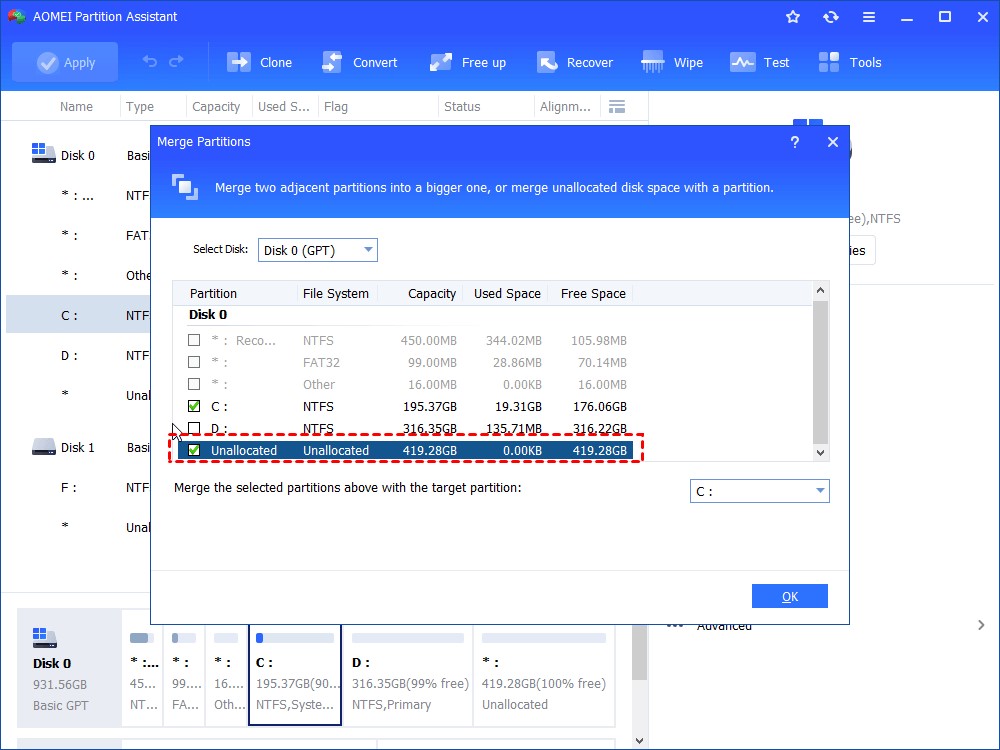
ステップ 3.次に、未割り当て領域が C ドライブに追加されたことがわかります。変更を保存するには、左上隅の「適用」ボタンをクリックしてください。
結論
まとめると、AOMEI Partition Assistant は、Windows ユーザーにとって信頼性が高く使いやすいパーティション ソフトウェアです。このソフトウェアを使用すると、複数のオペレーティング システムをセットアップしたり、パフォーマンスを向上させたり、ディスクをより適切に管理したりできます。これらの作業に必要なすべてのツールが揃っています。簡単な手順に従うだけで、ユーザーは簡単にドライブを拡張し、データを安全に保つことができます。

What Happens to Your Business Number When a Work Phone Is Lost, Stolen or Replaced?
What happens to your business number depends on where it lives. If the number is tied to the SIM in the lost phone, it stops working for you until the carrier issues a replacement SIM or eSIM, and calls from customers go nowhere in the meantime.
If the number lives in a cloud phone account instead, losing the phone doesn't take the number with it. Calls can ring the rest of the team straight away, and the employee signs into the calling app on a new phone to pick up where they left off, with their call history and voicemails still in the account.

Cricfy APK Download Latest Version For Android
Cricfy is a sports streaming application designed for users interested in watching live sports and following different sporting events. Its main focus is to provide convenient access to sports-related content through a mobile-friendly platform.
Cricket is an important part of its appeal, particularly for viewers who enjoy international matches, domestic competitions, and major cricket tournaments. Depending on the available content and supported sources, users may also find football and other sports-related options.
The application is particularly interesting for people who prefer watching sports on their Android devices rather than sitting in front of a television.

Uniwin-Global Rockchip Embedded Motherboards: Sourcing from China for MOQ, QC, Export and Technical Support
Sourcing Rockchip motherboards from China is a procurement question, not a price search. The seven things that actually decide whether a supplier works: pricing that scales with order size, a quality floor you can verify, export terms you can clear, a sample path that starts below the MOQ, technical support that answers, and engineering that catches integration issues before they cost you a quarter.
Uniwin-Global is the running example. The company has built Rockchip boards since 2016 [3], the current flagship is the RK3588 M588 with a 6 TOPS NPU [1], and the site lists 20+ countries served and 200+ projects delivered [4]. The published quality baseline is a sub-1% defect rate with a 1-year motherboard warranty, and the service baseline is a 2-hour response and 48-hour resolution [5, 6].
Two other supplier lanes exist: multi-platform makers that quote Rockchip alongside Allwinner and others, and dev-kit sellers that sell a reference board at a low price. Each lane fits a different stage of the project. The wrong lane is more expensive than the right one at the same unit price. Pick the lane first. The price follows.
One caution. A product page is a claim. The MOQ, the trade term, the QC gate and the SLA all need to be in writing before the PO is signed.

How to Build a HIFU Product Line That Distributors Can Manage
Every HIFU variant a distributor adds brings its own cartridge bin, manual, training file, and spare-parts list. Product lines rarely get out of hand through planning. They grow one request at a time: a different housing color, a narrower cartridge, a regional plug for one important clinic. Eventually pricing can't be explained in one sentence, and cartridge orders split across codes that look almost identical.
This guide is for distributors, importers, and private-label buyers who stock HIFU systems for clinics and med spas and carry the after-sales work themselves. It covers how to group clinic demand, which differences deserve their own model code, how to price tiers against landed cost, and how to plan cartridge replenishment and service records around machines already in the field. The aim is a line chosen by what you can stock, train, and service, rather than by what clinics happen to ask for.

Check SIM Owner Details in Pakistan Official Guide
Phones have become an integral part of human life. From making calls to mobile banking and shopping and social media every function requires a sim card to get connected in Pakistan. A responsible person must know how many sim cards are registered under his CNIC and if they are verified or not. The Check SIM Owner Details Pakistan system enables you to ensure that your SIM cards are legitimate and registered under your details.
While searching for Fresh SIM Database, it is critical to understand that SIM card details are private and confidential, and only the owner can check them. This article will explain what SIM owner details are, why it is essential to verify them, how to check them officially, and why it is safer to avoid unverified sources for checking.

Pak SIM Owner Details and SIM Ownership Complete Guide
It becomes difficult to understand and navigate SIM card registration and ownership in Pakistan considering all the regulations and the amount of information that is available online. You may have gotten a new SIM card, or you might be curious about how many SIM cards are associated with your CNIC number; in any case, having an understanding of the process is critical.

How to Check SIM Owner Details and Registration Status in Pakistan
Checking your SIM card details is very important in Pakistan today. Every mobile SIM card is directly linked to your CNIC number through thumb verification. Keeping an eye on your Pak Sim Owner Details protects your identity, stops scams, and makes sure nobody uses your name for wrong activities. Many people search for ways to check their Sim Owner Details 2026 status, see active numbers, and remove unused SIMs. This article explains how you can easily check everything yourself without any trouble.

Apple iPhone Duo Review: Foldable iPhone Specs, Price & Features
Apple is entering the foldable smartphone market with the iPhone Duo, a premium foldable iPhone built around two displays, the A20 Pro processor, a titanium construction, dual 48 MP cameras and a redesigned iOS experience focused on multitasking. But the iPhone Duo is interesting for another reason as well. A folding phone is inherently more complex than a conventional smartphone. It has two displays, a precision hinge, multiple operating positions and completely new ways of using cameras and applications.
 チェック IMEI


















