オンライン バックアップとは、ネットワーク接続を使用して、コンピューターまたはハード ディスクからリモート サーバー (一般にクラウド ストレージ サービスと呼ばれる) に情報をバックアップすることを指します。オンライン バックアップ サービスでは通常、データにアクセスし、バックアップの動作状態を監視するための Web ベースの管理コンソールが提供されます。
バックアップされたファイルは暗号化され、プロバイダーのデータセンターに保存されます。個人または組織は、インターネットに接続された任意のコンピューターまたはデバイスからデータのバックアップを直接ダウンロードして使用したり、アーカイブされたファイルを参照したりできます。

データ保護にオンライン バックアップを使用する理由
今日、あらゆる規模のユーザーや組織は、オンライン データ バックアップが提供する多くの利点により、オンライン データ バックアップにますます依存するようになっています。
- データ損失の回避: ローカル ストレージに保存されたデータは、ハードウェア障害、システム クラッシュ、自然災害などにより損失するリスクが依然としてあります。ただし、ファイルをオンラインでバックアップしておけば、火災、洪水、従業員による盗難などの災害が発生した場合でも、データは安全に保たれます。
- 初期コストが低い: オンライン バックアップでは通常、ハードウェアを購入する必要がなく、一定量の無料ストレージ スペースまたは一定期間の無料トライアルが提供されます。そのため、バックアップするファイルが少数の場合、料金を支払う必要さえありません。
- ユニバーサル リストア: ほとんどのオンライン バックアップでは、Web ブラウザー インターフェイスまたは PC クライアントを使用してファイルをバックアップおよび復元できます。したがって、ユニバーサル リストアを実行すると、2 つのデバイス間でファイルを転送することが非常に簡単になります。
Windows コンピュータ向けの無料オンライン バックアップ サービス
CBackup は、非常に便利でコスト効率が高いため、非常にお勧めの無料クラウド バックアップサービスです。Windows 11/10/8/8.1/7/XP 用に特別に設計されています。これを使用すると、コンピューターのファイルを簡単かつ安全にクラウドにバックアップできます。

CBackup がデータをリモートで保存するために提供するクラウド サーバーは CBackup Cloud と呼ばれ、最大 10 GB の無料バックアップ スペースを永久に利用できます。CBackup Cloud にバックアップされたデータは安全に保管され、いつでもクラウドから元の場所または別の場所にバックアップを復元できます。
さらに、CBackup はクラウド間のバックアップ、クラウド間の同期、クラウド ストレージ統合機能の実行に役立ちます。Google Drive、Dropbox、OneDrive など、多数の主流のクラウド ストレージをサポートしています。CBackup にクラウド ストレージ アカウントを追加すると、 Dropbox から OneDrive に移行するなど、追加したクラウド ドライブ間でファイルを直接すばやく移動できます。
CBackup でオンライン バックアップを作成する手順ガイド
ここでは、すべてのユーザーにとって最も簡単なインターフェースと操作性を備えた CBackup を使用して、オンラインでファイルをバックアップする方法を紹介します。
ステップ 1. CBackup ソフトウェアをダウンロードし、サインインするためのアカウントを作成します。
ステップ 2.バックアップ セクションに移動し、「PC を CBackup Cloud にバックアップ」をクリックしてオンライン バックアップを作成します。
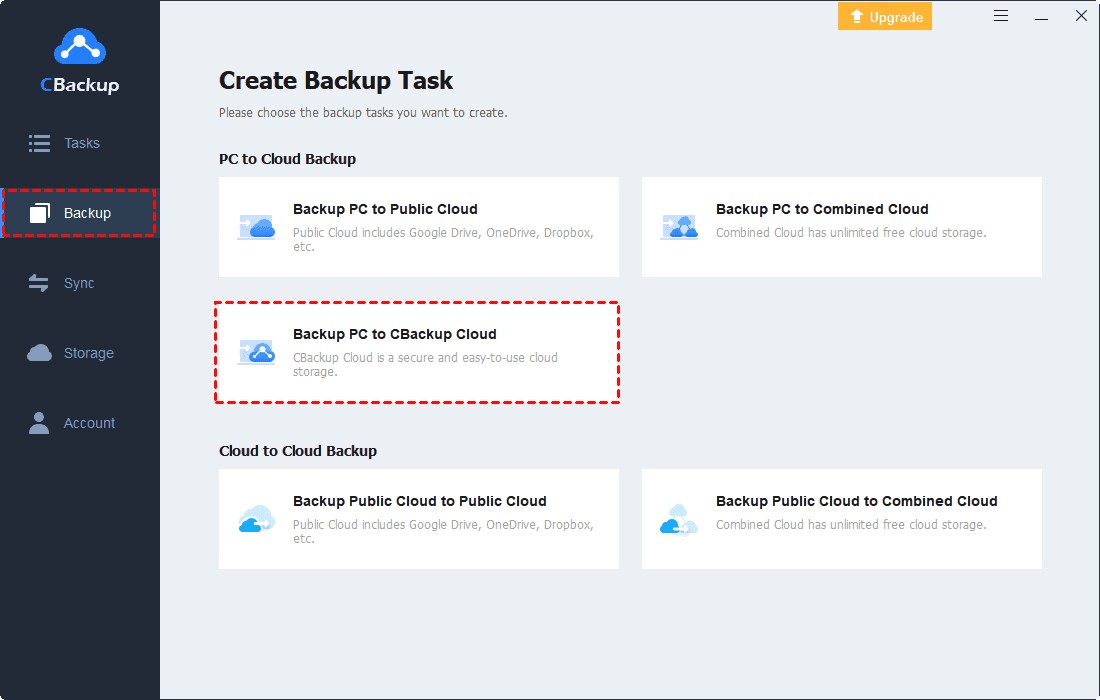
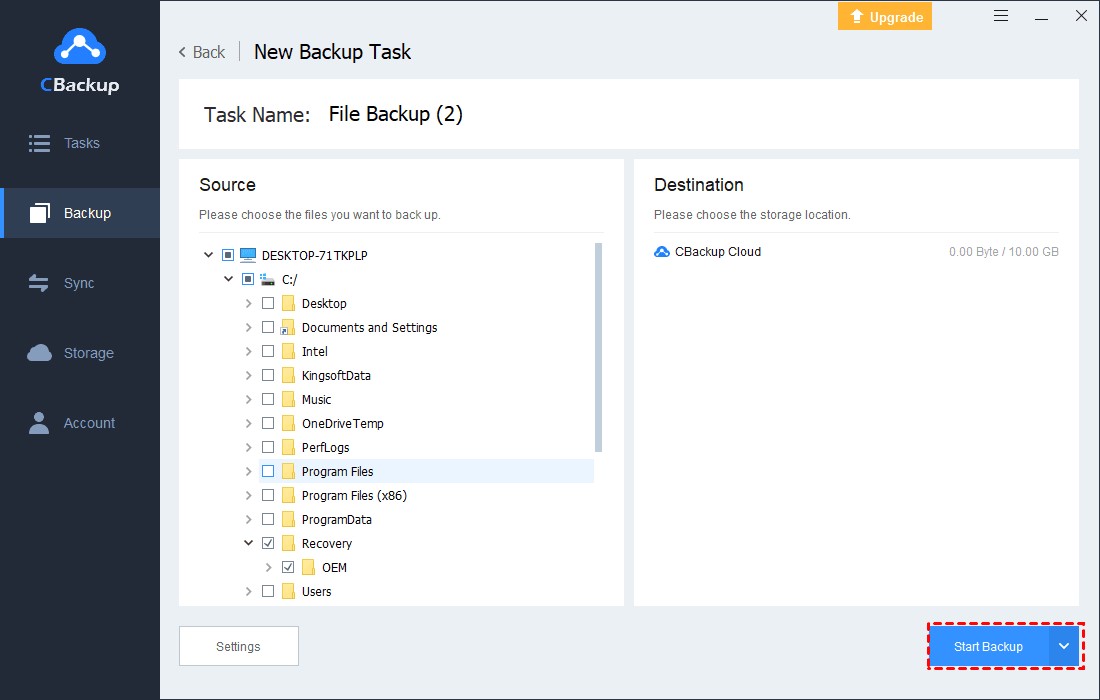
ステップ 3 . クラウドにバックアップする Windows PC ドキュメントまたはフォルダーを選択します。デフォルトでは、CBackup Cloud がバックアップ先として決定されます。
注意: CBackup は、クラウド バックアップの保存先として、Google Drive、Dropbox、OneDrive などの一般的なクラウド ドライブもサポートしています。[バックアップ] > [PC をパブリック クラウドにバックアップ]をクリックして選択できます。
ステップ 4.最後に、 「バックアップの開始」をクリックして、ファイルをオンラインでバックアップします。
無制限のオンラインバックアップスペースを無料で入手する方法
オンラインで保存するファイルやフォルダが増えると、クラウド バックアップの容量がさらに必要になる場合があります。データの無制限のオンライン バックアップを作成するために、CBackup は「クラウドの結合」機能を提供しており、無料でクラウド ストレージを結合して増やすことができます。
たとえば、2 つの無料 Google ドライブ アカウントを組み合わせて 30 GB の無料クラウド スペースを獲得できます。また、さまざまなプラットフォームからクラウドを選択したり、ニーズに応じて有料と無料のクラウド アカウントを組み合わせたりすることもできます。
ステップ 1 。ストレージ タブにクラウドを追加します。Google Drive、OneDrive、または Dropbox >今すぐ承認を選択します。指示に従って CBackup にクラウド権限を付与すると、無制限のクラウド アカウントを CBackup に追加できます。

ステップ 2.ストレージ セグメントで[+ 結合クラウドの追加]をクリックします。
ステップ 3.結合したクラウドの名前を変更し、追加したすべてのクラウド ドライブにチェックマークを付けて、[次へ] をクリックします。すべてのクラウド ドライブのバックアップ順序を決定し、[結合] をクリックします。

クラウドを結合すると、十分なクラウド アカウントがある限り、無制限のクラウド バックアップ スペースを取得できます。次に、[バックアップ] > [PC を結合したクラウドにバックアップ]をクリックすると、無制限のクラウド バックアップ スペースにファイルを保存できます。

まとめると
上記のガイドに従って、CBackup を利用してコンピューターのファイルとフォルダーの無料オンライン バックアップを作成できます。無制限のオンライン クラウド ストレージを取得したい場合は、このツールを使用してクラウドを結合し、クラウド バックアップ スペースを無料で増やすこともできます。さらに、CBackup はクラウド ストレージ管理とクラウド間の転送機能も提供します。このツールを入手して、1 つのインターフェイスだけで複数のサービスを利用できるようにし、時間と労力を節約しましょう。

What Happens to Your Business Number When a Work Phone Is Lost, Stolen or Replaced?
What happens to your business number depends on where it lives. If the number is tied to the SIM in the lost phone, it stops working for you until the carrier issues a replacement SIM or eSIM, and calls from customers go nowhere in the meantime.
If the number lives in a cloud phone account instead, losing the phone doesn't take the number with it. Calls can ring the rest of the team straight away, and the employee signs into the calling app on a new phone to pick up where they left off, with their call history and voicemails still in the account.

Cricfy APK Download Latest Version For Android
Cricfy is a sports streaming application designed for users interested in watching live sports and following different sporting events. Its main focus is to provide convenient access to sports-related content through a mobile-friendly platform.
Cricket is an important part of its appeal, particularly for viewers who enjoy international matches, domestic competitions, and major cricket tournaments. Depending on the available content and supported sources, users may also find football and other sports-related options.
The application is particularly interesting for people who prefer watching sports on their Android devices rather than sitting in front of a television.

Uniwin-Global Rockchip Embedded Motherboards: Sourcing from China for MOQ, QC, Export and Technical Support
Sourcing Rockchip motherboards from China is a procurement question, not a price search. The seven things that actually decide whether a supplier works: pricing that scales with order size, a quality floor you can verify, export terms you can clear, a sample path that starts below the MOQ, technical support that answers, and engineering that catches integration issues before they cost you a quarter.
Uniwin-Global is the running example. The company has built Rockchip boards since 2016 [3], the current flagship is the RK3588 M588 with a 6 TOPS NPU [1], and the site lists 20+ countries served and 200+ projects delivered [4]. The published quality baseline is a sub-1% defect rate with a 1-year motherboard warranty, and the service baseline is a 2-hour response and 48-hour resolution [5, 6].
Two other supplier lanes exist: multi-platform makers that quote Rockchip alongside Allwinner and others, and dev-kit sellers that sell a reference board at a low price. Each lane fits a different stage of the project. The wrong lane is more expensive than the right one at the same unit price. Pick the lane first. The price follows.
One caution. A product page is a claim. The MOQ, the trade term, the QC gate and the SLA all need to be in writing before the PO is signed.

How to Build a HIFU Product Line That Distributors Can Manage
Every HIFU variant a distributor adds brings its own cartridge bin, manual, training file, and spare-parts list. Product lines rarely get out of hand through planning. They grow one request at a time: a different housing color, a narrower cartridge, a regional plug for one important clinic. Eventually pricing can't be explained in one sentence, and cartridge orders split across codes that look almost identical.
This guide is for distributors, importers, and private-label buyers who stock HIFU systems for clinics and med spas and carry the after-sales work themselves. It covers how to group clinic demand, which differences deserve their own model code, how to price tiers against landed cost, and how to plan cartridge replenishment and service records around machines already in the field. The aim is a line chosen by what you can stock, train, and service, rather than by what clinics happen to ask for.

Check SIM Owner Details in Pakistan Official Guide
Phones have become an integral part of human life. From making calls to mobile banking and shopping and social media every function requires a sim card to get connected in Pakistan. A responsible person must know how many sim cards are registered under his CNIC and if they are verified or not. The Check SIM Owner Details Pakistan system enables you to ensure that your SIM cards are legitimate and registered under your details.
While searching for Fresh SIM Database, it is critical to understand that SIM card details are private and confidential, and only the owner can check them. This article will explain what SIM owner details are, why it is essential to verify them, how to check them officially, and why it is safer to avoid unverified sources for checking.

Pak SIM Owner Details and SIM Ownership Complete Guide
It becomes difficult to understand and navigate SIM card registration and ownership in Pakistan considering all the regulations and the amount of information that is available online. You may have gotten a new SIM card, or you might be curious about how many SIM cards are associated with your CNIC number; in any case, having an understanding of the process is critical.

How to Check SIM Owner Details and Registration Status in Pakistan
Checking your SIM card details is very important in Pakistan today. Every mobile SIM card is directly linked to your CNIC number through thumb verification. Keeping an eye on your Pak Sim Owner Details protects your identity, stops scams, and makes sure nobody uses your name for wrong activities. Many people search for ways to check their Sim Owner Details 2026 status, see active numbers, and remove unused SIMs. This article explains how you can easily check everything yourself without any trouble.

Apple iPhone Duo Review: Foldable iPhone Specs, Price & Features
Apple is entering the foldable smartphone market with the iPhone Duo, a premium foldable iPhone built around two displays, the A20 Pro processor, a titanium construction, dual 48 MP cameras and a redesigned iOS experience focused on multitasking. But the iPhone Duo is interesting for another reason as well. A folding phone is inherently more complex than a conventional smartphone. It has two displays, a precision hinge, multiple operating positions and completely new ways of using cameras and applications.
 チェック IMEI


















