في هذه الأيام، ومع تحول كل شيء إلى الرقمية، غالبًا ما تفيض صناديق البريد الوارد لدينا بمعلومات حيوية تتراوح من الإيصالات المالية وتأكيدات السفر إلى تحديثات المشاريع ومراسلات العملاء.
فكر في مدى الإزعاج الذي قد تشعر به عند طلب بريد إلكتروني مهم ولكنك لا تتمكن من عرضه بسبب عدم توافق البرنامج أو ضعف الاتصال بالإنترنت. هناك حل سريع وفعال يتمثل في تحويل رسائل البريد الإلكتروني في Outlook إلى تنسيق PDF.
من ناحية أخرى، قد يكون حفظ رسائل البريد الإلكتروني في Outlook في ملفات PDF عبر الطرق التقليدية أمرًا شاقًا ويستغرق وقتًا طويلاً. كما أن طباعة كل رسالة بريد إلكتروني يدويًا أمر مزعج، واستخدام الإضافات الخارجية قد يشكل مخاطر أمنية وتوافقية. لحسن الحظ، هناك طريقة محسنة! MultCloud ، وهو حل متطور قائم على السحابة يجعل تحويل رسائل البريد الإلكتروني في Outlook إلى ملفات PDF أسهل.
MultCloud - أفضل أداة لحفظ رسائل البريد الإلكتروني في Outlook بصيغة PDF
بمساعدة MultCloud، يمكنك بسهولة دمج وإدارة الملفات عبر مختلف موفري التخزين السحابي بفضل واجهته سهلة الاستخدام. يتم التخلص من الصعوبات المرتبطة باستخدام تقنيات أرشفة البريد الإلكتروني التقليدية باستخدام MultCloud. هكذا يتم تبسيط الإجراء:

التكامل المبسط مع Outlook: يمكنك التعامل مع رسائل البريد الإلكتروني الخاصة بك مباشرةً داخل MultCloud من خلال دمجه بسهولة مع حساب Outlook الخاص بك. لا حاجة للتعامل مع إجراءات التكوين الصعبة أو تنزيل برامج إضافية.
التحويل على دفعات لتحقيق الكفاءة: وداعًا للطباعة اليدوية المتكررة! يتيح لك MultCloud تحديد وتحويل رسائل بريد إلكتروني متعددة إلى ملفات PDF دفعة واحدة. وهذا يمثل تغييرًا جذريًا لأولئك الذين يحتاجون إلى أرشفة كمية كبيرة من رسائل البريد الإلكتروني بكفاءة.
خيارات تنزيل قابلة للتخصيص للتحكم: أعطِ الأولوية للتحكم باستخدام خيارات التنزيل القابلة للتخصيص من MultCloud. اختر ما إذا كنت تريد تضمين المرفقات في ملفات PDF الخاصة بك أو استبعادها للحصول على تنسيق أكثر انسيابية. يضمن هذا المستوى من التحكم التفصيلي أن رسائل البريد الإلكتروني المؤرشفة تلبي احتياجاتك المحددة.
التوافق بين الأنظمة الأساسية : نظرًا لأن MultCloud يعتمد على السحابة، فيمكن الوصول إليه من أي جهاز متصل بالإنترنت. وهذا يوفر للمحترفين المعاصرين أقصى قدر من الحرية من خلال تمكينك من تحويل رسائل البريد الإلكتروني في Outlook إلى ملفات PDF من سطح المكتب أو الكمبيوتر المحمول أو الجهاز اللوحي أو حتى الهاتف الذكي!
دليل خطوة بخطوة لحفظ رسائل البريد الإلكتروني في Outlook بتنسيق PDF باستخدام MultCloud
الآن بعد أن فهمت فوائد MultCloud، دعنا ننتقل إلى العملية سهلة الاستخدام لتحويل رسائل البريد الإلكتروني في Outlook إلى ملفات PDF:
الجزء 1. التسجيل وربط حساب Outlook الخاص بك
1. انتقل إلى موقع MultCloud وقم بإنشاء حساب مجاني باستخدام عنوان البريد الإلكتروني المفضل لديك أو عن طريق تسجيل الدخول باستخدام Google أو Facebook.

2. بمجرد تسجيل الدخول، انتقل إلى قسم " إضافة السحابة ". ستجد هنا قائمة بموفري خدمات التخزين السحابي المختلفة، بما في ذلك Outlook. انقر فوق أيقونة Outlook لبدء عملية التكامل.
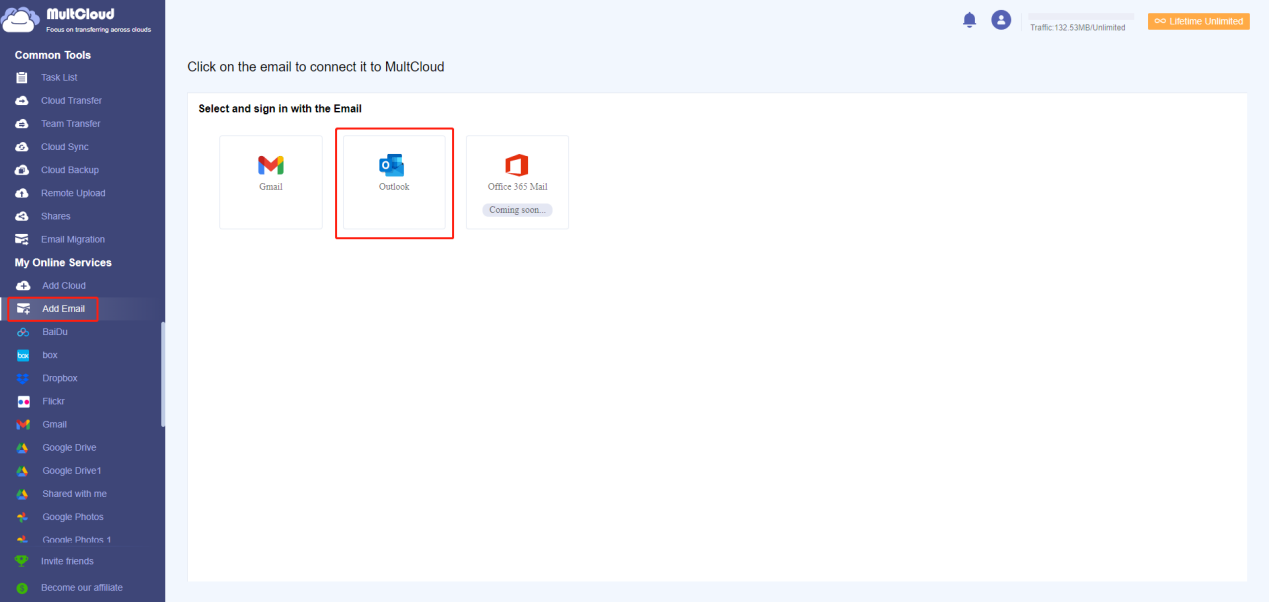
3. اتبع الإرشادات التي تظهر على الشاشة لمنح MultCloud حق الوصول الآمن إلى حساب Outlook الخاص بك. يتضمن هذا عادةً إدخال بيانات اعتماد Outlook ومنح الأذونات اللازمة.
ملاحظة : يمكنك أيضًا إجراء نسخة احتياطية لرسائل البريد الإلكتروني في Google Workspace على جهاز محلي أو سحابي بعد إضافة Gmail إلى MultCloud.
الجزء 2. اختيار رسائل البريد الإلكتروني للتحويل (فردية أو دفعة واحدة)
1. ستظهر مجلدات البريد الإلكتروني الخاصة بك بشكل منسوخ على MultCloud عند ربطها بحساب Outlook الخاص بك.
2. كل ما عليك فعله لتحويل بريد إلكتروني واحد هو اختيار البريد الإلكتروني الذي تريد الاحتفاظ به، والانتقال إلى المجلد المطلوب، ثم النقر بزر الماوس الأيمن فوقه.
3. من قائمة السياق، حدد خيار " تنزيل ". سيؤدي هذا إلى بدء عملية التحويل لرسالة البريد الإلكتروني المحددة.
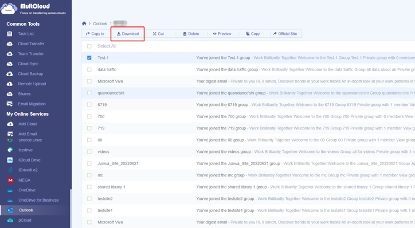
4. لتحويل الدفعات، حدد "تحديد الكل" لتحديد جميع رسائل البريد الإلكتروني من المجلد المطلوب. يتيح لك MultCloud تحديد ما يصل إلى 200 رسالة في المرة الواحدة.
5. بمجرد تحديد كافة رسائل البريد الإلكتروني، اختر " تنزيل " من القائمة.
الجزء 3. تخصيص إعدادات التنزيل (بما في ذلك المرفقات)
قبل بدء عملية التنزيل، يقدم MultCloud بعض خيارات التخصيص المفيدة:
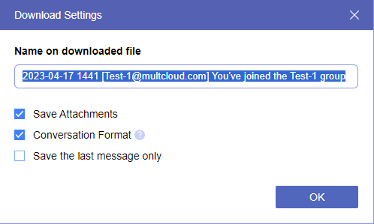
- حفظ المرفقات : اختر ما إذا كنت تريد تضمين المرفقات في ملفات PDF التي تم تنزيلها أو استبعادها للحصول على حجم ملف أصغر.
- تنسيق التحويل : سيتم إزالة المحتوى المشار إليه عند التنشيط.
- حفظ الرسالة الأخيرة فقط : بعد تحديد هذا الخيار، سيقوم النظام بحفظ الرسالة الأخيرة فقط بشكل افتراضي.
الجزء 4. بدء عملية التنزيل وحفظ ملفات PDF الخاصة بك
- بمجرد مراجعة إعدادات التنزيل وتعديلها وفقًا لتفضيلاتك، انقر فوق الزر "موافق".
- اعتمادًا على عدد رسائل البريد الإلكتروني التي تقوم بتحويلها، قد تستغرق العملية بضع ثوانٍ أو دقائق. سيخطرك MultCloud بمجرد اكتمال التحويل.
- انتقل إلى مجلد التنزيل المخصص على جهازك للوصول إلى ملفات PDF المحولة حديثًا. ستحصل الآن على نسخ منظمة وسهلة الوصول إليها من رسائل البريد الإلكتروني المهمة في Outlook.
ما وراء الأساسيات: الميزات المتقدمة لـ MultCloud
لا يوفر MultCloud أكثر من مجرد تحويل البريد الإلكتروني إلى PDF. إليك بعض ميزاته المتقدمة التي يمكنها تحسين تجربة إدارة التخزين السحابي:
- نقل رسائل البريد الإلكتروني بين العديد من مقدمي خدمات التخزين السحابي : هل تستخدم خدمات تخزين سحابي متعددة مثل Dropbox وGoogle Drive؟ يتيح لك MultCloud نقل رسائل البريد الإلكتروني (والملفات الأخرى) بسلاسة بين هذه المنصات. وهذا يلغي الحاجة إلى إدارة عمليات تسجيل دخول متعددة ويبسط نظام التخزين السحابي الخاص بك.
- جدولة النسخ الاحتياطية الآلية لراحة البال : تأكد من عدم فقد رسائل البريد الإلكتروني المهمة لديك أبدًا باستخدام ميزة جدولة النسخ الاحتياطية الآلية من MultCloud. قم بإعداد النسخ الاحتياطية الآلية على فترات منتظمة لإنشاء نسخة آمنة وزائدة عن الحاجة من رسائل البريد الإلكتروني الخاصة بك في السحابة. يوفر هذا طبقة إضافية من الحماية ضد الحذف العرضي أو فقدان البيانات.
تسلط هذه الميزات المتقدمة الضوء على قدرات MultCloud التي تتجاوز مجرد تحويل البريد الإلكتروني. فهي تضع نفسها كحل شامل لإدارة السحابة يلبي احتياجات المستخدمين الذين يحتاجون إلى نهج أكثر قوة لتنظيم البيانات والأمان.
خاتمة
تمكنك MultCloud من التغلب على فوضى صناديق البريد الواردة الممتلئة من خلال تقديم حل مبسط وفعال لتحويل رسائل البريد الإلكتروني في Outlook إلى ملفات PDF. لقد ولت أيام الطباعة اليدوية المملة أو التعامل مع الإضافات الخارجية. مع MultCloud، يمكنك:
- التكامل بسلاسة مع حساب Outlook الخاص بك لإدارة البريد الإلكتروني بسهولة.
- قم بتحويل رسائل البريد الإلكتروني الفردية أو الدفعات دفعة واحدة، مما يوفر لك وقتًا ثمينًا.
- قم بتخصيص خيارات التنزيل لضمان أن ملفات PDF الخاصة بك تلبي احتياجاتك المحددة.
- يمكنك الوصول إلى ملفات PDF المحولة من أي جهاز متصل بالإنترنت، مما يزيد من المرونة.

What Happens to Your Business Number When a Work Phone Is Lost, Stolen or Replaced?
What happens to your business number depends on where it lives. If the number is tied to the SIM in the lost phone, it stops working for you until the carrier issues a replacement SIM or eSIM, and calls from customers go nowhere in the meantime.
If the number lives in a cloud phone account instead, losing the phone doesn't take the number with it. Calls can ring the rest of the team straight away, and the employee signs into the calling app on a new phone to pick up where they left off, with their call history and voicemails still in the account.

Cricfy APK Download Latest Version For Android
Cricfy is a sports streaming application designed for users interested in watching live sports and following different sporting events. Its main focus is to provide convenient access to sports-related content through a mobile-friendly platform.
Cricket is an important part of its appeal, particularly for viewers who enjoy international matches, domestic competitions, and major cricket tournaments. Depending on the available content and supported sources, users may also find football and other sports-related options.
The application is particularly interesting for people who prefer watching sports on their Android devices rather than sitting in front of a television.

Uniwin-Global Rockchip Embedded Motherboards: Sourcing from China for MOQ, QC, Export and Technical Support
Sourcing Rockchip motherboards from China is a procurement question, not a price search. The seven things that actually decide whether a supplier works: pricing that scales with order size, a quality floor you can verify, export terms you can clear, a sample path that starts below the MOQ, technical support that answers, and engineering that catches integration issues before they cost you a quarter.
Uniwin-Global is the running example. The company has built Rockchip boards since 2016 [3], the current flagship is the RK3588 M588 with a 6 TOPS NPU [1], and the site lists 20+ countries served and 200+ projects delivered [4]. The published quality baseline is a sub-1% defect rate with a 1-year motherboard warranty, and the service baseline is a 2-hour response and 48-hour resolution [5, 6].
Two other supplier lanes exist: multi-platform makers that quote Rockchip alongside Allwinner and others, and dev-kit sellers that sell a reference board at a low price. Each lane fits a different stage of the project. The wrong lane is more expensive than the right one at the same unit price. Pick the lane first. The price follows.
One caution. A product page is a claim. The MOQ, the trade term, the QC gate and the SLA all need to be in writing before the PO is signed.

How to Build a HIFU Product Line That Distributors Can Manage
Every HIFU variant a distributor adds brings its own cartridge bin, manual, training file, and spare-parts list. Product lines rarely get out of hand through planning. They grow one request at a time: a different housing color, a narrower cartridge, a regional plug for one important clinic. Eventually pricing can't be explained in one sentence, and cartridge orders split across codes that look almost identical.
This guide is for distributors, importers, and private-label buyers who stock HIFU systems for clinics and med spas and carry the after-sales work themselves. It covers how to group clinic demand, which differences deserve their own model code, how to price tiers against landed cost, and how to plan cartridge replenishment and service records around machines already in the field. The aim is a line chosen by what you can stock, train, and service, rather than by what clinics happen to ask for.

Check SIM Owner Details in Pakistan Official Guide
Phones have become an integral part of human life. From making calls to mobile banking and shopping and social media every function requires a sim card to get connected in Pakistan. A responsible person must know how many sim cards are registered under his CNIC and if they are verified or not. The Check SIM Owner Details Pakistan system enables you to ensure that your SIM cards are legitimate and registered under your details.
While searching for Fresh SIM Database, it is critical to understand that SIM card details are private and confidential, and only the owner can check them. This article will explain what SIM owner details are, why it is essential to verify them, how to check them officially, and why it is safer to avoid unverified sources for checking.

Pak SIM Owner Details and SIM Ownership Complete Guide
It becomes difficult to understand and navigate SIM card registration and ownership in Pakistan considering all the regulations and the amount of information that is available online. You may have gotten a new SIM card, or you might be curious about how many SIM cards are associated with your CNIC number; in any case, having an understanding of the process is critical.

How to Check SIM Owner Details and Registration Status in Pakistan
Checking your SIM card details is very important in Pakistan today. Every mobile SIM card is directly linked to your CNIC number through thumb verification. Keeping an eye on your Pak Sim Owner Details protects your identity, stops scams, and makes sure nobody uses your name for wrong activities. Many people search for ways to check their Sim Owner Details 2026 status, see active numbers, and remove unused SIMs. This article explains how you can easily check everything yourself without any trouble.

Apple iPhone Duo Review: Foldable iPhone Specs, Price & Features
Apple is entering the foldable smartphone market with the iPhone Duo, a premium foldable iPhone built around two displays, the A20 Pro processor, a titanium construction, dual 48 MP cameras and a redesigned iOS experience focused on multitasking. But the iPhone Duo is interesting for another reason as well. A folding phone is inherently more complex than a conventional smartphone. It has two displays, a precision hinge, multiple operating positions and completely new ways of using cameras and applications.
 تحقق من IMEI


















