يشير النسخ الاحتياطي عبر الإنترنت إلى استخدام اتصال شبكة لنسخ المعلومات احتياطيًا من جهاز كمبيوتر أو قرص ثابت إلى خادم بعيد (يُشار إليه عادةً باسم خدمة التخزين السحابي). توفر خدمات النسخ الاحتياطي عبر الإنترنت عادةً وحدة تحكم إدارة قائمة على الويب للوصول إلى البيانات ومراقبة الحالة التشغيلية للنسخ الاحتياطي.
سيتم تشفير الملفات الاحتياطية وتخزينها في مركز بيانات المزود. ويمكن للأفراد أو المؤسسات تنزيل واستخدام النسخ الاحتياطية للبيانات مباشرة أو تصفح الملفات المؤرشفة من أي جهاز أو كمبيوتر متصل بالإنترنت.

لماذا استخدام النسخ الاحتياطي عبر الإنترنت لحماية البيانات؟
اليوم، يعتمد المستخدمون والمؤسسات من جميع الأحجام بشكل متزايد على النسخ الاحتياطي للبيانات عبر الإنترنت بسبب المزايا العديدة التي يوفرها:
- تجنب فقدان البيانات : لا تزال البيانات المخزنة في التخزين المحلي معرضة لخطر الفقدان بسبب فشل الأجهزة، وتعطل النظام، والكوارث الطبيعية. ولكن إذا قمت بعمل نسخة احتياطية لملفاتك عبر الإنترنت، فستظل بياناتك آمنة حتى في حالة وقوع كارثة مثل الحريق أو الفيضان أو سرقة الموظفين.
- تكلفة أولية منخفضة : لا يتطلب النسخ الاحتياطي عبر الإنترنت عادةً شراء أي أجهزة، وسيوفر لك قدرًا معينًا من مساحة التخزين المجانية أو نسخة تجريبية مجانية لفترة زمنية معينة. لذا، إذا كنت تحتاج فقط إلى نسخ عدد قليل من الملفات احتياطيًا، فلن تحتاج حتى إلى دفع أي شيء.
- الاستعادة الشاملة : تتيح لك معظم عمليات النسخ الاحتياطي عبر الإنترنت إجراء نسخ احتياطية واستعادة الملفات باستخدام واجهة متصفح الويب أو عميل الكمبيوتر الشخصي. وبالتالي، من خلال إجراء الاستعادة الشاملة، يصبح من السهل جدًا عليك نقل الملفات بين جهازين.
خدمة النسخ الاحتياطي المجانية عبر الإنترنت لأجهزة الكمبيوتر التي تعمل بنظام Windows
CBackup هي خدمة نسخ احتياطي سحابي مجانية موصى بها بشدة لأنها مفيدة للغاية وفعالة من حيث التكلفة. وهي مصممة خصيصًا لنظام التشغيل Windows 11/10/8/8.1/7/XP. بواسطتها، يمكنك بسهولة وأمان نسخ ملفات الكمبيوتر احتياطيًا إلى السحابة.

يُطلق على الخادم السحابي الذي تقدمه CBackup للاحتفاظ ببياناتك عن بُعد اسم CBackup Cloud، حيث يمكنك الاستمتاع بما يصل إلى 10 جيجابايت من مساحة النسخ الاحتياطي المجانية إلى الأبد. ستظل البيانات التي تم نسخها احتياطيًا في CBackup Cloud آمنة ويمكنك استعادة النسخ الاحتياطية من السحابة إلى الموقع الأصلي أو موقع مختلف في أي وقت.
علاوة على ذلك، يمكن أن يساعدك CBackup في إجراء النسخ الاحتياطي من السحابة إلى السحابة، والمزامنة من السحابة إلى السحابة، وميزات الجمع بين التخزين السحابي. فهو يدعم العديد من خدمات التخزين السحابي السائدة مثل Google Drive وDropbox وOneDrive وما إلى ذلك. بعد إضافة حسابات التخزين السحابي الخاصة بك على CBackup، يمكنك نقل الملفات بين محركات الأقراص السحابية المضافة، مثل نقل Dropbox إلى OneDrive ، بشكل مباشر وسريع.
دليل خطوة بخطوة لإنشاء نسخة احتياطية عبر الإنترنت باستخدام CBackup
هنا، سنعرض لك كيفية عمل نسخة احتياطية للملفات عبر الإنترنت بمساعدة CBackup، الذي يتمتع بأسهل واجهة وتشغيل لجميع المستخدمين:
الخطوة 1. انتقل إلى تنزيل برنامج CBackup، ثم قم بإنشاء حساب لتسجيل الدخول.
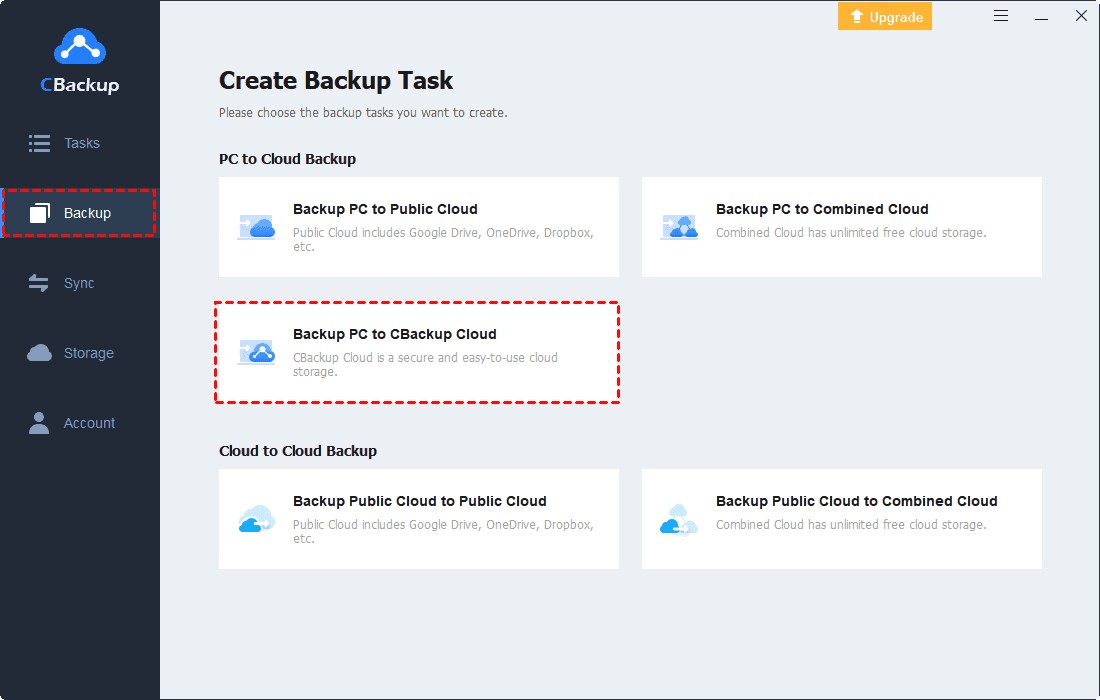
الخطوة 2. انتقل إلى قسم النسخ الاحتياطي وانقر فوق النسخ الاحتياطي لجهاز الكمبيوتر الخاص بك إلى CBackup Cloud لإجراء النسخ الاحتياطي عبر الإنترنت.
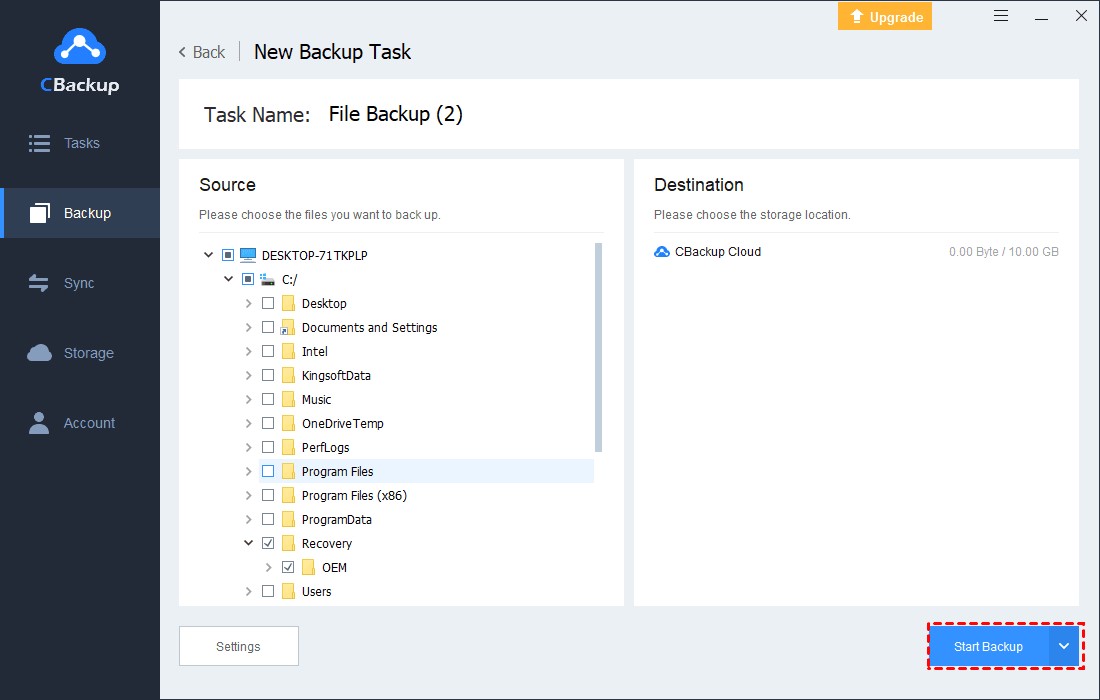
الخطوة 3. حدد المستندات أو المجلدات الخاصة بجهاز الكمبيوتر الذي يعمل بنظام Windows والتي تريد نسخها احتياطيًا إلى السحابة. يتم تحديد CBackup Cloud كوجهة للنسخ الاحتياطي افتراضيًا.
ملاحظة: يدعم CBackup أيضًا محركات الأقراص السحابية الشهيرة، على سبيل المثال، Google Drive وDropbox وOneDrive كوجهات للنسخ الاحتياطي السحابي. يمكنك النقر فوق النسخ الاحتياطي > النسخ الاحتياطي للكمبيوتر الشخصي إلى السحابة العامة للاختيار.
الخطوة 4. أخيرًا، انقر فوق "بدء النسخ الاحتياطي" لإجراء نسخ احتياطي لملفاتك عبر الإنترنت.
كيفية الحصول على مساحة نسخ احتياطي غير محدودة عبر الإنترنت مجانًا
مع وجود المزيد من الملفات والمجلدات التي يتعين عليك تخزينها عبر الإنترنت، قد تحتاج إلى مساحة أكبر للنسخ الاحتياطي السحابي. لإنشاء نسخ احتياطية غير محدودة عبر الإنترنت لبياناتك، تقدم CBackup ميزة "Combine Cloud" التي يمكن أن تساعدك على دمج وزيادة مساحة التخزين السحابي دون أي تكلفة.
على سبيل المثال، يمكنك دمج حسابين مجانيين على Google Drive للحصول على مساحة سحابية مجانية تبلغ 30 جيجابايت؛ ويمكنك اختيار السحابة من منصات مختلفة أو دمج الحسابات السحابية المدفوعة والمجانية وفقًا لاحتياجاتك.
الخطوة 1. أضف السحابات الخاصة بك في علامة التبويب "التخزين". حدد Google Drive أو OneDrive أو Dropbox > تفويض الآن . اتبع الإرشادات لمنح صلاحية السحابة لـ CBackup، ويمكنك إضافة حسابات سحابية غير محدودة إلى CBackup.

الخطوة 2. انقر فوق + إضافة سحابة مجمعة في جزء التخزين.
الخطوة 3. أعد تسمية السحابة المدمجة وحدد جميع محركات السحابة التي أضفتها، ثم انقر فوق "التالي". حدد ترتيب النسخ الاحتياطي لجميع محركات السحابة لديك وانقر فوق "دمج".

بعد الجمع بين السحابات، يمكنك الحصول على مساحة نسخ احتياطي سحابية غير محدودة طالما أن لديك عددًا كافيًا من حسابات السحابة. الآن، انقر فوق النسخ الاحتياطي > النسخ الاحتياطي للكمبيوتر الشخصي إلى السحابة المجمعة ، ويمكنك حفظ الملفات في مساحة النسخ الاحتياطي السحابية غير المحدودة.

ليتم تلخيصه
يمكنك اتباع الدليل أعلاه لعمل نسخة احتياطية مجانية عبر الإنترنت لملفات ومجلدات الكمبيوتر لديك بمساعدة CBackup. إذا كنت ترغب في الحصول على مساحة تخزين سحابية غير محدودة عبر الإنترنت، فيمكنك أيضًا الاعتماد على هذه الأداة لدمج السحابات وزيادة مساحة النسخ الاحتياطي السحابي مجانًا. بالإضافة إلى ذلك، تقدم CBackup إدارة التخزين السحابي ووظائف النقل من سحابة إلى سحابة. احصل على هذه الأداة، ووفر الوقت والجهد بواجهة واحدة فقط للاستمتاع بخدمات متعددة.

What Happens to Your Business Number When a Work Phone Is Lost, Stolen or Replaced?
What happens to your business number depends on where it lives. If the number is tied to the SIM in the lost phone, it stops working for you until the carrier issues a replacement SIM or eSIM, and calls from customers go nowhere in the meantime.
If the number lives in a cloud phone account instead, losing the phone doesn't take the number with it. Calls can ring the rest of the team straight away, and the employee signs into the calling app on a new phone to pick up where they left off, with their call history and voicemails still in the account.

Cricfy APK Download Latest Version For Android
Cricfy is a sports streaming application designed for users interested in watching live sports and following different sporting events. Its main focus is to provide convenient access to sports-related content through a mobile-friendly platform.
Cricket is an important part of its appeal, particularly for viewers who enjoy international matches, domestic competitions, and major cricket tournaments. Depending on the available content and supported sources, users may also find football and other sports-related options.
The application is particularly interesting for people who prefer watching sports on their Android devices rather than sitting in front of a television.

Uniwin-Global Rockchip Embedded Motherboards: Sourcing from China for MOQ, QC, Export and Technical Support
Sourcing Rockchip motherboards from China is a procurement question, not a price search. The seven things that actually decide whether a supplier works: pricing that scales with order size, a quality floor you can verify, export terms you can clear, a sample path that starts below the MOQ, technical support that answers, and engineering that catches integration issues before they cost you a quarter.
Uniwin-Global is the running example. The company has built Rockchip boards since 2016 [3], the current flagship is the RK3588 M588 with a 6 TOPS NPU [1], and the site lists 20+ countries served and 200+ projects delivered [4]. The published quality baseline is a sub-1% defect rate with a 1-year motherboard warranty, and the service baseline is a 2-hour response and 48-hour resolution [5, 6].
Two other supplier lanes exist: multi-platform makers that quote Rockchip alongside Allwinner and others, and dev-kit sellers that sell a reference board at a low price. Each lane fits a different stage of the project. The wrong lane is more expensive than the right one at the same unit price. Pick the lane first. The price follows.
One caution. A product page is a claim. The MOQ, the trade term, the QC gate and the SLA all need to be in writing before the PO is signed.

How to Build a HIFU Product Line That Distributors Can Manage
Every HIFU variant a distributor adds brings its own cartridge bin, manual, training file, and spare-parts list. Product lines rarely get out of hand through planning. They grow one request at a time: a different housing color, a narrower cartridge, a regional plug for one important clinic. Eventually pricing can't be explained in one sentence, and cartridge orders split across codes that look almost identical.
This guide is for distributors, importers, and private-label buyers who stock HIFU systems for clinics and med spas and carry the after-sales work themselves. It covers how to group clinic demand, which differences deserve their own model code, how to price tiers against landed cost, and how to plan cartridge replenishment and service records around machines already in the field. The aim is a line chosen by what you can stock, train, and service, rather than by what clinics happen to ask for.

Check SIM Owner Details in Pakistan Official Guide
Phones have become an integral part of human life. From making calls to mobile banking and shopping and social media every function requires a sim card to get connected in Pakistan. A responsible person must know how many sim cards are registered under his CNIC and if they are verified or not. The Check SIM Owner Details Pakistan system enables you to ensure that your SIM cards are legitimate and registered under your details.
While searching for Fresh SIM Database, it is critical to understand that SIM card details are private and confidential, and only the owner can check them. This article will explain what SIM owner details are, why it is essential to verify them, how to check them officially, and why it is safer to avoid unverified sources for checking.

Pak SIM Owner Details and SIM Ownership Complete Guide
It becomes difficult to understand and navigate SIM card registration and ownership in Pakistan considering all the regulations and the amount of information that is available online. You may have gotten a new SIM card, or you might be curious about how many SIM cards are associated with your CNIC number; in any case, having an understanding of the process is critical.

How to Check SIM Owner Details and Registration Status in Pakistan
Checking your SIM card details is very important in Pakistan today. Every mobile SIM card is directly linked to your CNIC number through thumb verification. Keeping an eye on your Pak Sim Owner Details protects your identity, stops scams, and makes sure nobody uses your name for wrong activities. Many people search for ways to check their Sim Owner Details 2026 status, see active numbers, and remove unused SIMs. This article explains how you can easily check everything yourself without any trouble.

Apple iPhone Duo Review: Foldable iPhone Specs, Price & Features
Apple is entering the foldable smartphone market with the iPhone Duo, a premium foldable iPhone built around two displays, the A20 Pro processor, a titanium construction, dual 48 MP cameras and a redesigned iOS experience focused on multitasking. But the iPhone Duo is interesting for another reason as well. A folding phone is inherently more complex than a conventional smartphone. It has two displays, a precision hinge, multiple operating positions and completely new ways of using cameras and applications.
 تحقق من IMEI


















